
Angles Drawing Game with Radians (Interactive Randomized Practice)
Loading the math board and drawing, please wait…
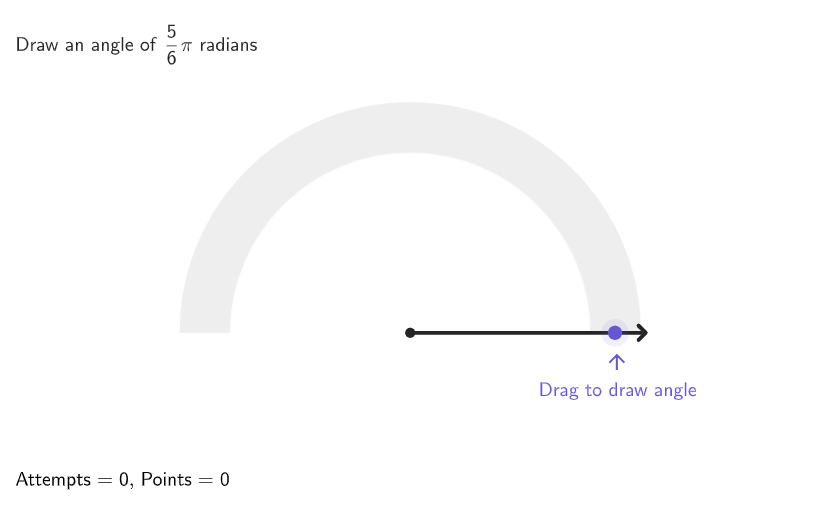
This GeoGebra app presents an interactive game where random target angles are generated and students draw the corresponding angles using radians as accurately as possible; the app then checks correctness and provides feedback with timing and scoring. It focuses on the geometric representation of angles (rays/endpoint points, angle marks) and the key concept of measuring and constructing angles in radian mode. The construction combines Geometry and logic: Shuffle creates randomAngles and randomAngle; Semicircle and Circle (with Segment/Sector) define the angle workspace and visual reference; Point/Element/Angle build movable endpoints (e.g., AngEndpoint) and compute displayed angles (α, β) for user input; Vector/Translate/Dilate help position and express geometric elements; If, Text, CountIf/Last/Sequence manage answer checking, counting, and sequencing; timer plus buttons (btnCheck, btnResetApp) support gameplay flow. Suitable for grades 9–12 and for classroom or independent practice on radian-based angle construction and measurement.
GeoGebra Commands & Parameters
Shuffle({1 / 2, 1 / 3, 2 / 3, 1 / 4, 3 / 4, 1 / 6, 5 / 6, 1, 1 / 12, 5 / 12, 7 / 12, 1 / 10, 3 / 10, 9 / 10}) → randomAngles, {0.8333333333333334, 0.08333333333333333, 0.3333333333333333, 0.4166666666666667, 0.5833333333333334, 0.25, 0.1, 0.75, 0.6666666666666666, 0.5, 1, 0.9, 0.3, 0.16666666666666666}Semicircle((-4, 0), (4, 0)) → cPoint(c) → MovablePointAngle(AngEndpoint, CentAng, MovablePoint) → αElement(randomAngles, Mod[questionCount, Length[randomAngles]] + 1) → randomAngleCorner(5) → AppSizeCircle(CentAng, 3.5) → dCircle(CentAng, 4.5) → eSegment(CentAng, AnimP) → animSegAngle(AngEndpoint, CentAng, AnimP) → βSector(e, Max[angRad - Rad5, 0], Min[angRad + Rad5, pi]) → fTranslate((0, 0), Vector[If[β ≤ 30°, Vector[(0.5 * (cos((2 * angRad)), sin((2 * angRad))))], Vector[(1.1 * (cos(angRad / 3), sin(angRad / 3)))]]]) → PosLabelCorrectATranslate((0, 0), Vector[If[α ≤ 30°, Vector[(2 * (cos((3 * α / 2)), sin((3 * α / 2))))], Vector[(2 * (cos(α / 2), sin(α / 2)))]]]) → PosLabelAlfaDilate(MovablePoint, 1.3) → AnimP'If(perfect, 5, If[moreCorrect, 3, If[correct, 1, 0]]) → PointsToAddSector(e, angRad + (3 * Rad5), pi) → pVector(AnimP', Target) → vecSector(e, Max[angRad - (3 * Rad5), 0], Min[angRad - Rad5, pi]) → gSector(e, Max[angRad + Rad5, 0], Min[angRad + (3 * Rad5), pi]) → hSector(e, 0, angRad - (3 * Rad5)) → kText(((("\textsf{+" * PointsToAdd) * If[perfect, " Perfect!", ""]) * "}"), AnimP' + (vec * wait^(2)), true, true, 0, 0) → textPlus1Last(histCorrect, Min[Length[histCorrect], 3]) → histCorrectLast3If(Length[histCorrect] ≟ 0, {}, Last[histCorrect, Min[5, Length[histCorrect]]]) → histCorrectLast5Sequence(Rotate[(4, 0), ii], ii, 0, 180°, If[hint2, 45°, 90°]) → pointsHint1Sequence(Rotate[(4.3, 0), ii], ii, 0, 180°, If[hint2, 45°, 90°]) → pointsHint2Zip(Dilate[AA, 1.15], AA, pointsHint1) → PointsHintLabelsSequence(Text[ii], ii, 0, 180, If[hint2, 45, 90]) → hintLabelsZip(Segment[AA, BB], AA, pointsHint1, BB, pointsHint2) → hintSegmentsZip(Text[(tt * "°"), AA, true, true, 0, 1], AA, PointsHintLabels, tt, hintLabels) → hintlabelsPositionedCountIf(x ≟ false, histCorrectLast3) → falseIn3CountIf(x ≟ false, histCorrectLast5) → falseIn5Semicircle((-4.5, 0), (4.5, 0)) → graySemicircleSegment(CentAng, Dilate[AngEndpoint, 1.15]) → FixedSegmentSegment(CentAng, Dilate[MovablePoint, 1.15]) → MovableSegmentonboardingTextOffset(Corner[onboardingText_{1}, 1], Corner[onboardingText_{1}, 3], onboardingCase_{1}, Corner[1], Corner[3], Corner[5]) → OnboardingTextOffset_{1}circlePixels(MovablePoint, 7 + (7 * pulsing), Corner[1], Corner[3], Corner[5]) → pulsingObjectText((FractionText[β / pi] * "\pi"), PosLabelCorrectA, true, true, 0, 1) → labelCorrectAngText((FractionText[α / pi] * "\pi"), PosLabelAlfa, true, true, 0, 1) → labelStudAng
AI Drawing Prompt Reference
Create an interactive angle drawing practice game. Draw a horizontal semicircle at the bottom as the baseline with a draggable point on it. Create two concentric circles centered on the screen with radii 3.5 and 4.5 as reference. Display the target angle range using differently colored sectors showing correct, too small, and too large ranges. Show current and target angles labeled as fractions of π (such as 1/2π, 1/3π). Include score display, feedback text, and a hint system showing degree markings from 0° to 180°. The overall scene presents a randomized practice for geometric angle measurement and construction using radians.
The prompt above was compiled from the original drawing commands and is for reference only.