
Angle-Side-Angle (ASA): Quick Exploration
Loading the math board and drawing, please wait…
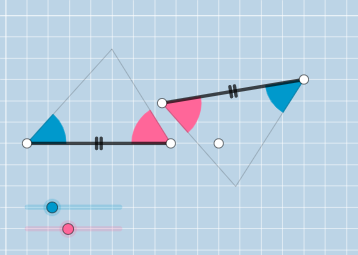
This example demonstrates constructing a triangle using two given angles and the included side, verifying the Angle-Side-Angle congruence theorem. It involves core concepts like triangle congruence, angle measurement, and segment length. Construction uses GeoGebra commands such as Ray, Rotate, Point, Intersect, Segment, and Circle. Suitable for middle school and above students learning geometric constructions and proofs.
GeoGebra Commands & Parameters
Ray(A, B) → fRotate(B, α, A) → B'Ray(A, B') → gPoint(f) → CRotate(A, (-β), C) → A'Ray(C, A') → hIntersect(g, h) → DSegment(A, C) → iSegment(A, D) → jSegment(D, C) → kMin({i, j, k}) → aCircle(A, (0.35 * a)) → cCircle(C, (0.35 * a)) → dIntersect(c, i) → E,Intersect(c, j, 1) → FIntersect(d, i, 1) → GIntersect(d, k, 1) → HCircleSector(A, E, F) → eCircleSector(C, H, G) → pCircle(I, i) → qPoint(q) → JSegment(I, J) → lRotate(J, α, I) → J'Ray(I, J') → mRotate(I, (-β), J) → I'Ray(J, I') → nIntersect(m, n) → KSegment(I, K) → rSegment(K, J) → sLine(L, M) → tCircle(I, (0.35 * a)) → c_1Circle(J, (0.35 * a)) → d_1Intersect(c_1, l, 1) → NIntersect(c_1, r, 1) → OIntersect(d_1, s) → P,Intersect(d_1, l, 1) → QCircleSector(J, P, Q) → e_1CircleSector(I, N, O) → f_1Rotate(J, (-α), I) → J'_{1}Rotate(I, β, J) → I'_{1}Ray(I, J'_{1}) → bRay(J, I'_{1}) → g_1Intersect(b, g_1) → RPolygon(A, C, D) → t1, d_2, a_1, c_2
AI Drawing Prompt Reference
Draw a triangle with two given angles α and β and the included side AC. Start by drawing a ray AB, then rotate point B to get B'. Draw a ray AB', and pick a point C on it. Rotate point A around C by -β to get A', and draw a ray CA'. The intersection of these two rays is point D. Connect AD and CD to form triangle ACD.
The prompt above was compiled from the original drawing commands and is for reference only.