
Angle Pairs 6
Loading the math board and drawing, please wait…
In collections
LAHS Angle Pairs
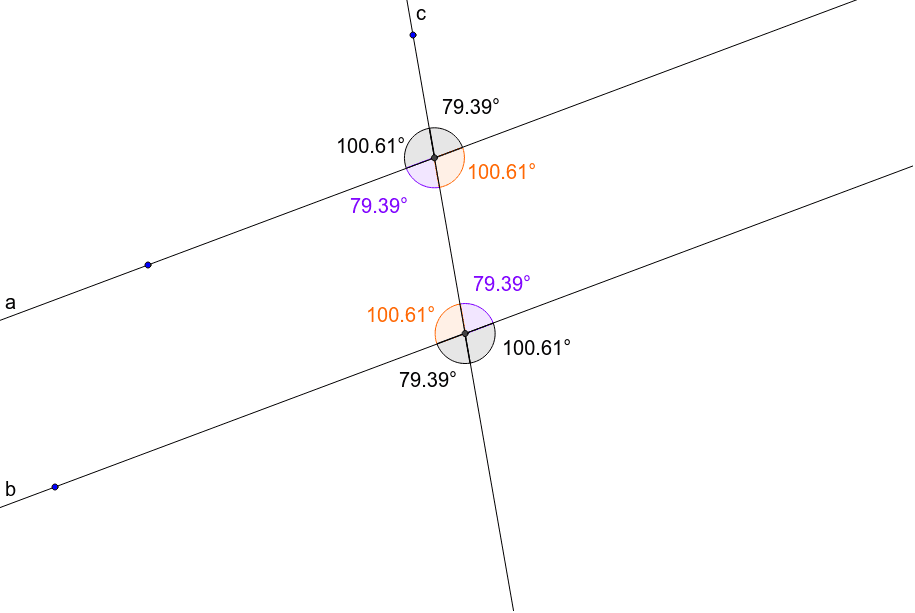
This example is designed for teacher demonstrations, illustrating basic concepts of angle pairs such as vertical angles and adjacent supplementary angles. Using GeoGebra commands like Line, Intersect, Point, Ray, and Angle, it provides a visual representation of angle pair properties. Suitable for middle school and above students learning geometric construction.
GeoGebra Commands & Parameters
Line(A, B) → aLine(C, a) → bLine(D, E) → cIntersect(a, c) → FIntersect(b, c) → GPoint(a) → HPoint(b) → IPoint(a) → JPoint(b) → KPoint(c) → LPoint(c) → MRay(F, H) → dRay(F, L) → eRay(F, J) → fRay(F, M) → gRay(G, K) → hRay(G, L) → iRay(G, I) → jRay(G, M) → kAngle(d, e) → αAngle(e, f) → βAngle(f, g) → γAngle(g, d) → δAngle(j, i) → εAngle(i, h) → ζAngle(h, k) → ηAngle(k, j) → θ
AI Drawing Prompt Reference
Draw two horizontal lines that intersect, then add a diagonal line crossing both, creating two intersection points. Place two points on each line. From each intersection point, draw four rays to these points, forming two sets of four adjacent angles around each intersection. Mark all eight angles with arcs and label them with Greek letters to illustrate vertical angle equality and supplementary adjacent angles.
The prompt above was compiled from the original drawing commands and is for reference only.