
GeoGebra Geometric Construction Example: Orthogonal Lines and Parameter Labeling
Loading the math board and drawing, please wait…
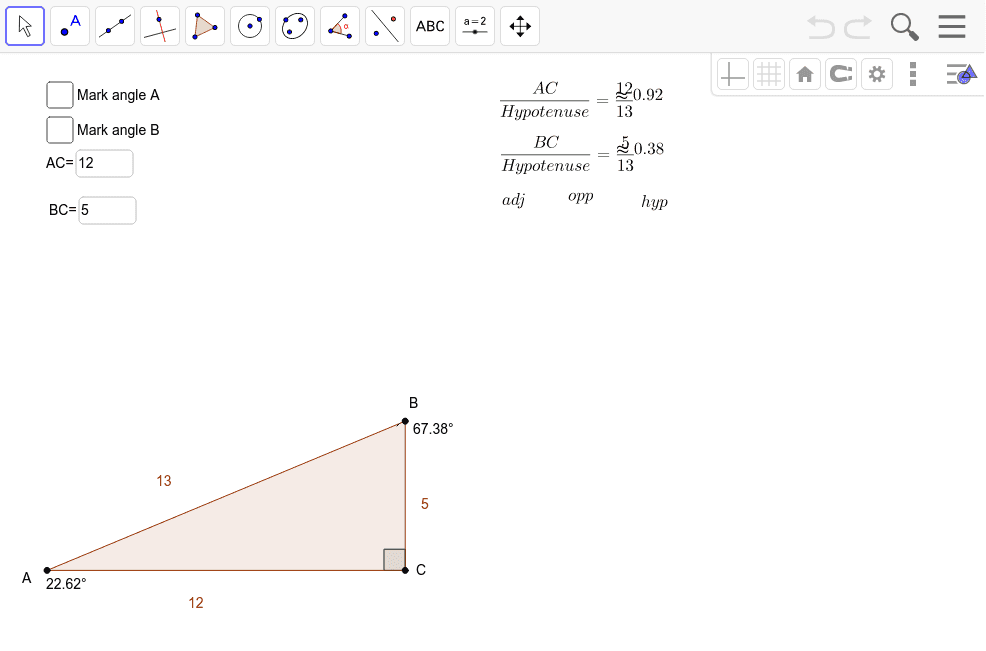
This example demonstrates drawing orthogonal lines and labeling parameters in GeoGebra. Key math concepts include geometric construction, coordinate systems, and parameterization. Construction involves OrthogonalLine, Point, Polygon commands, and vertical/horizontal line creation. Suitable for middle school or high school students learning geometric basics and parameter labeling techniques.
GeoGebra Commands & Parameters
OrthogonalLine(C, xAxis) → a_2Point(xAxis) → APolygon(A, B, C) → poly1, c, a, bAngle(B, C, A) → βAngle(C, A, B) → γAngle(A, B, C) → δTextfield(horizontal) → inputBox1Textfield(vertical) → inputBox2Angle(C, B, A) → αAngle(C, A, B) → ε
AI Drawing Prompt Reference
Draw a right triangle ABC with AB and BC as perpendicular sides. Use input boxes to enter the lengths of AB and BC, then draw the triangle based on the input lengths and label the three interior angles α, β, γ, and δ. Ensure AB is parallel to the x-axis and BC is perpendicular to the x-axis.
The prompt above was compiled from the original drawing commands and is for reference only.