
Comparing trig ratios: A geometric and trigonometric demonstration
Loading the math board and drawing, please wait…
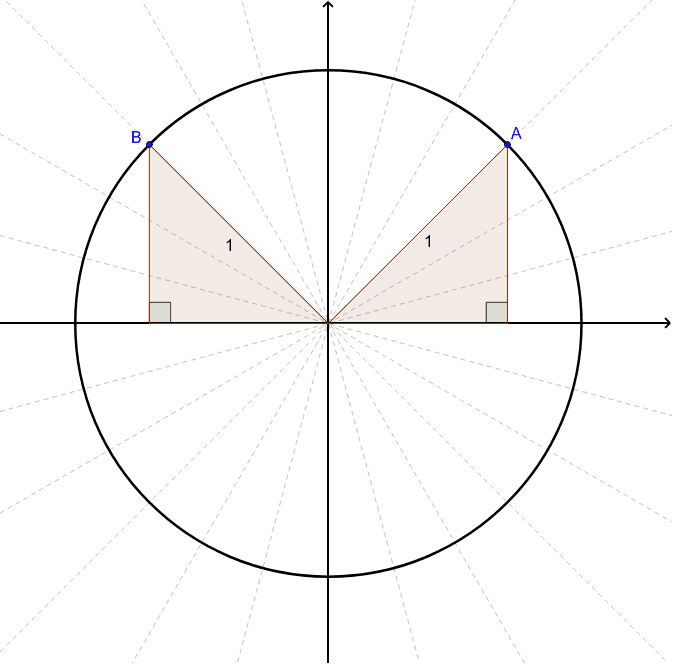
This example illustrates the concept of trigonometric ratios through geometric figures, aiding students in understanding their application in geometry. Key mathematical concepts include trigonometric ratios, geometric construction, and graphing functions. Construction involves using GeoGebra commands like Point, Segment, OrthogonalLine to create triangles and angles. Suitable for middle or high school students for classroom demonstration or self-study.
GeoGebra Commands & Parameters
Point(c) → APoint(c) → BSegment(A_1, A) → aSegment(A_1, B) → bOrthogonalLine(A, xAxis) → dOrthogonalLine(B, xAxis) → eIntersect(e, xAxis) → DIntersect(d, xAxis) → EPolygon(A_1, A, E) → poly1, e_1, a_1, b_1Polygon(A_1, B, D) → poly2, d_1, a_2, c_1Angle(A, E, A_1) → αAngle(B, D, A_1) → β
AI Drawing Prompt Reference
Draw a figure consisting of two triangles. The first triangle has vertices A, E, and A_1. The second triangle has vertices B, D, and A_1. The triangles share the common vertex A_1. Place the triangles in a coordinate system to clearly show their sides and angle relationships.
The prompt above was compiled from the original drawing commands and is for reference only.