
Angle Measurement Practice
Loading the math board and drawing, please wait…
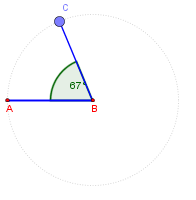
This is a simple worksheet for measuring angles, helping students understand the concept of angles. It uses GeoGebra commands such as Circle, Segment, Point, Angle, and Rotate for geometric construction. Suitable for 4th grade students to learn basic angle concepts and measurement.
GeoGebra Commands & Parameters
Circle(B, A) → cSegment(B, A) → aPoint(c) → CSegment(B, C) → bAngle(C, B, A) → αRotate(A, (-β), B) → DAngle(D, B, A) → γ
AI Drawing Prompt Reference
Draw a circle with a center point and a point on the circle, connected by a radius. Place another point on the circle and draw a second radius from the center to that point, forming an angle between the two radii, which is labeled. Then rotate the first radius around the center by an adjustable angle to create a new radius, forming another angle with the first radius, also labeled. The figure includes a circle, three radii, and two marked angles for angle measurement practice.
The prompt above was compiled from the original drawing commands and is for reference only.