
Angle Addition Identities
Loading the math board and drawing, please wait…
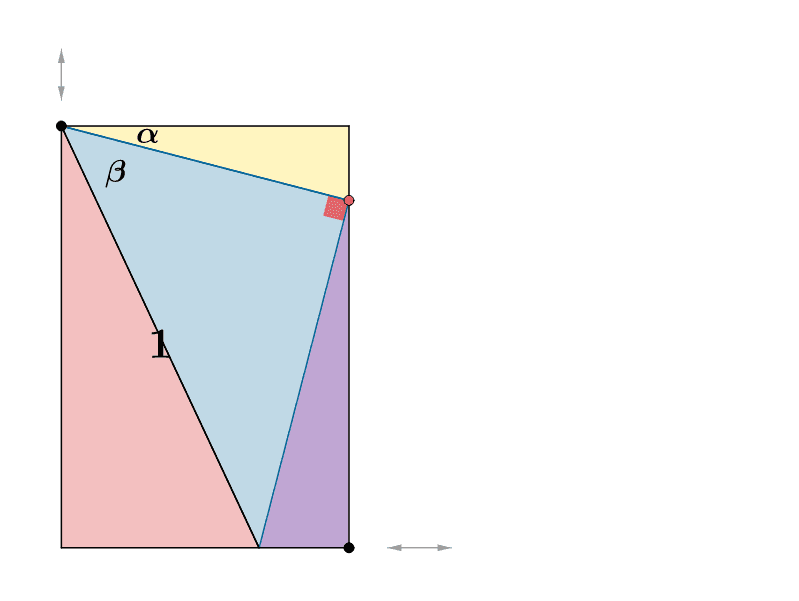
This example demonstrates the angle addition identities. It involves core trigonometry concepts and constructs the geometric representation using GeoGebra commands such as Ray, Point, OrthogonalLine, Intersect, etc. Suitable for high school mathematics education and learning.
GeoGebra Commands & Parameters
Ray(A, B) → fRay(A, C) → gPoint(g) → DPoint(f) → EOrthogonalLine(D, g) → hOrthogonalLine(E, f) → iIntersect(h, i) → FSegment(A, E) → jSegment(F, E) → kSegment(F, D) → lSegment(D, A) → mPoint(k) → GSegment(D, G) → nOrthogonalLine(G, n) → pIntersect(p, j) → HSegment(H, D) → qPolygon(D, G, H) → poly1, h_1, d, g_1Angle(D, G, H) → αAngularBisector(H, D, G) → rPoint(r) → JAngularBisector(F, D, G) → sPoint(s) → KAngularBisector(D, H, A) → tPoint(t) → LPolygon(D, G, F) → poly2, f_1, d_1, g_2Polygon(H, E, G) → poly3, g_3, h_2, ePolygon(A, H, D) → poly4, d_2, a, h_3RotateText(text5, Angle[E, H, G]) → text6RotateText(text7, Angle[F, D, G]) → text8RotateText(text14, 90°) → text15AngularBisector(H, G, E) → bPoint(b) → UVector(V, W) → uVector(W, V) → vVector(Z, A_1) → wVector(A_1, Z) → c
AI Drawing Prompt Reference
Draw a geometric representation of angle addition identities, starting with two rays AB and AC. Take point D on ray AC and point E on ray AB. Construct perpendicular lines to DE and EF, intersecting at point F. Connect segments AE, EF, FD, DA, EG, GF, FH, and DH. Construct the angle bisectors of angles EFG, FDG, and DHF, and label their angles as α, β, and γ. Finally, construct the intersection point U of the angle bisectors of angles EFG, FDG, and DHF.
The prompt above was compiled from the original drawing commands and is for reference only.