
Alternative Solution to Triangle Construction Challenge #1
Loading the math board and drawing, please wait…
In collections
Congruence (CO) Cluster
Congruence (Vol 2)
CCSS High School: Geometry (Congruence) Volume 2
CCSS High School: Geometry (Congruence) Volume 2
CCSS High School: Geometry (Congruence) Volume 2
Geometry (Congruence) Volume 2
CCSS High School: Geometry (Congruence) Volume 2
CCSS High School: Geometry (Congruence) Volume 2
CCSS High School: Geometry (Congruence) Volume 2
CCSS High School: Geometry (Congruence) Volume 2
CCSS High School: Geometry (Congruence) Volume 2
CCSS High School: Geometry (Congruence) Volume 2
CCSS High School: Geometry (Congruence) Volume 2
Gail LeBlancCCSS High School: Geometry (Congruence) Volume 2
CCSS High School: Geometry (Congruence) Volume 2
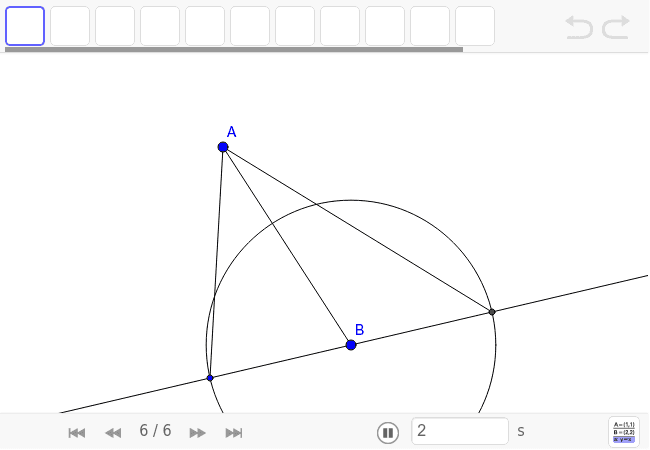
This example demonstrates an alternative method to solve Triangle Construction Challenge #1 using GeoGebra tools, specifically reflecting in a point instead of a circle. Core math concepts include geometric construction, triangles, and reflection. Construction highlights involve using GeoGebra commands like Segment, Circle, Line, and Intersect; suitable for middle school and above students exploring geometric construction techniques.
GeoGebra Commands & Parameters
Segment(A, B) → aCircle(B, C) → cLine(C, B) → bIntersect(c, b, 2) → DSegment(A, D) → eSegment(A, C) → d
AI Drawing Prompt Reference
Start by drawing a segment as one side of a triangle. Then, using one endpoint of that segment as the center, draw a circle that passes through a given point. Next, draw a line from the center through that given point, and mark where it intersects the circle again. Connect this new intersection point to the other endpoint of the original segment to form the second side. Finally, connect the original segment's endpoint to the given point to complete the triangle. The final figure includes a circle, a line, and three segments forming a triangle with auxiliary construction.
The prompt above was compiled from the original drawing commands and is for reference only.