
Alternate Interior Angles Task 2: Construction Check via Thin-Slice Positions
Loading the math board and drawing, please wait…
In collections
Parallel Lines and Related Angles: Guided Exploration
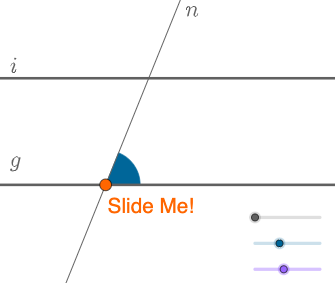
This example demonstrates the geometric property of alternate interior angles: when two lines are cut by a transversal, the interior angles on opposite sides remain equal. It emphasizes this relationship through a “thin-slice” style construction, where the transversal position is handled via dynamic transformations so students can observe how the angle correspondence persists. Key concepts include alternate interior angle theorem, angle measurement with straight lines and transversals, and supporting constructions with circles (including inscribed-circle related elements), intersection points, and arc visualization. Construction highlights in GeoGebra: Point and Line to define key points and lines; Angle to create and label the relevant angles (e.g., α, β, γ); Circle and Intersect to obtain circle/line intersection geometry; Segment and Ray to set angle sides and rays; Rotate, Translate, and Vector to generate different transversal configurations; CircleArc and CircleSector to display arcs/sectors that support the visual reasoning. Suitable for secondary school geometry, contest preparation, and interactive classroom demonstrations of angle theorems.
GeoGebra Commands & Parameters
Point(y = 0) → ALine(A, B) → fRotate(B, α, A) → B'Angle(B, A, B') → γLine(A, B') → gRotate(B', β, A) → B''Angle(B', A, B'') → δLine(A, B'') → hCircle(A, a) → cIntersect(c, h, 2) → CLine(C, g) → iCircle(C, A) → dCircle(A, C) → eIntersect(e, h, 2) → JSegment(A, C) → jCircle(A, (0.3 * j)) → kCircle(C, (0.3 * j)) → pIntersect(p, h) → N, OIntersect(k, h) → P, QIntersect(k, g) → T, UIntersect(p, i, 2) → VIntersect(p, i, 1) → WCircleSector(A, U, Q) → qCircle(C, j / 2) → g_1Circle(A, j / 2) → h_1Intersect(g_1, i, 2) → DIntersect(g_1, i, 1) → EIntersect(g_1, h, 2) → HIntersect(g_1, h) → I, ZIntersect(h_1, h) → A_1, B_1Intersect(h_1, g) → E_1, F_1Point(j) → G_1Vector(A, G_1) → uTranslate(q, u) → q'Segment(A, G_1) → lRay(A, A_1) → mRay(C, H) → nVector(A, G_1) → vSegment(G_1, C) → sCircleArc(A, U, Q) → tCircleArc(C, N, O) → rPoint(r) → FRotate(F, (-δ), C) → F'Angle(F', C, F) → εCircleSector(C, F', F) → c_1Segment(A, C) → b
AI Drawing Prompt Reference
Draw a horizontal line with a point on it as the vertex. From this vertex, construct three rays forming two pairs of adjacent angles. Draw a circle centered at the vertex intersecting one ray, and through that intersection draw a line parallel to another ray, creating a transversal. Use auxiliary circles centered at the vertex and the intersection point to mark additional intersection points on the rays)Skip. Construct circular arcs and sectors to highlight the alternate interior angles formed by the transversal. Finally, translate and rotate one sector to another position to visually demonstrate that the alternate interior angles are equal.
The prompt above was compiled from the original drawing commands and is for reference only.