
Algebraic Surface z = xy(x²-1)(y²-1) in 3D
Loading the math board and drawing, please wait…
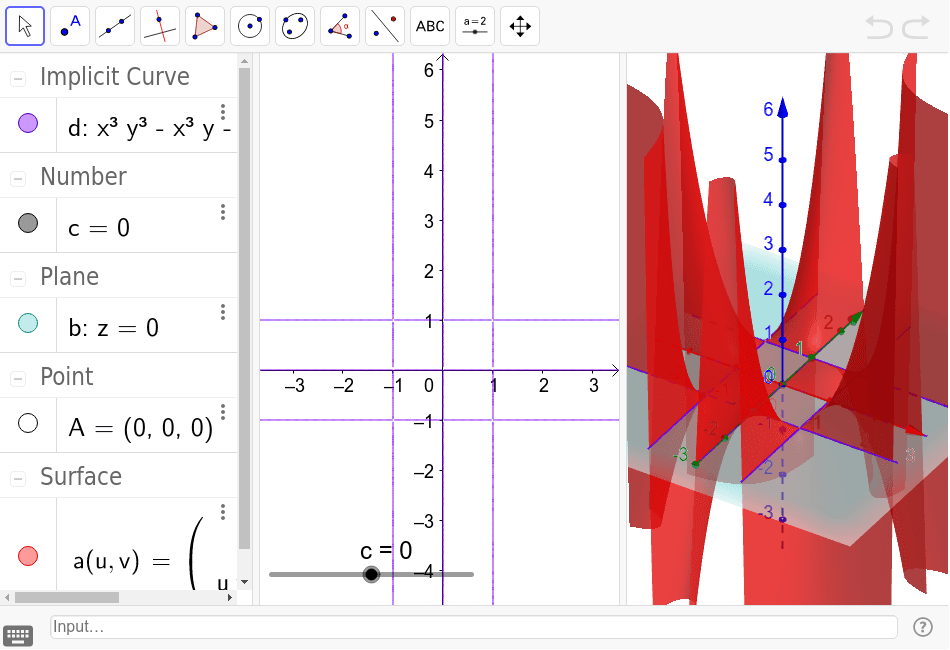
This example visualizes the algebraic surface defined by the bivariate polynomial z = xy(x²-1)(y²-1) in three-dimensional space. It demonstrates how a polynomial equation in x and y produces a complex surface with multiple lobes and saddle-like regions. The core mathematical concepts include algebraic surfaces, polynomial functions, and intersections with coordinate planes. Construction uses GeoGebra's Surface command to plot the parametric surface, OrthogonalPlane to create auxiliary planes, and ImplicitCurve to generate implicit curves that reveal cross-sections. Objects include surface a, plane c, point A, and curves b and d. This is suitable for advanced high school or undergraduate students studying multivariable calculus, analytic geometry, or computer-aided mathematics, and serves as a vivid tool for exploring surface equations and spatial reasoning.
GeoGebra Commands & Parameters
Surface(u, v, (((u * v) * (u^(2) - 1)) * (v^(2) - 1)), u, -3, 3, v, -3, 3) → aOrthogonalPlane(A, zAxis) → bImplicitCurve((((x * y) * (x^(2) - 1)) * (y^(2) - 1)) - c) → d
AI Drawing Prompt Reference
Draw a 3D algebraic surface defined by z = xy(x²-1)(y²-1). The surface has multiple lobes and saddle-like regions. Show intersections with coordinate planes to help understand its shape.
The prompt above was compiled from the original drawing commands and is for reference only.