
Adjustable Prism Extrusion: GM1-06-P2 Interactive Solid Geometry
Loading the math board and drawing, please wait…
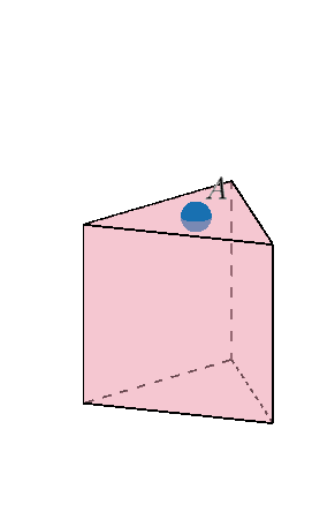
This example demonstrates an adjustable prism and its extrusion process, allowing users to dynamically change the height and base shape by dragging points or using sliders, thereby visualizing the construction of a 3D solid. Core mathematical concepts include the definition of a prism, relationships between bases and lateral faces, parallelism and perpendicularity in space, and coordinate/integer point labeling. The construction uses GeoGebra commands: Point, Polygon, LineBisector, Intersect, Segment, Prism, Circle, and Text. Key objects include vertices A, B, C, D, E, F, base polygon poly1, lateral faces such as faceABJheight, faceBCKJ, faceCDLK, faceDEML, faceEFNM, faceFHON, and the height segment. This is suitable for middle and high school solid geometry lessons, helping students understand prism composition, the effect of parameter changes on volume and surface area, and exploring coordinate geometry with integer points.
GeoGebra Commands & Parameters
Point(Circle[A, sqrt(8 - (8 * cos((2 * π / Sides))))]) → BPolygon(A, B, Sides) → poly1, g, D, E, F, H_1, I, h, i, j, k, l, q, r, CLineBisector(h) → pSegment(A, B) → fLineBisector(f) → mIntersect(m, p) → GSegment((x(G), y(G), 0), (x(G), y(G), 5)) → centersegmentPoint(centersegment) → HSegment((x(A), y(A), 0.01), (x(A), y(A), z(H))) → sPoint(s) → heightPrism(poly1, height) → a, J, faceCDLK, faceDEML, faceEFNM, faceFHON, faceHIPO, faceAheightPI, faceheightJKLMNOP, edgeAheight, edgeBJ, edgeCK, K, edgeDL, edgeEM, edgeFN, edgeHO, edgeIP, edgeheightJ, edgeJK, edgeKL, edgeLM, edgeMN, L, edgeNO, edgeOP, edgeheightP, M, N, O, P, faceABJheight, faceBCKJCircle(Q, 0.25) → RadioOutline1Circle(Q1, 0.25) → RadioOutline1_1Circle(Q2, 0.25) → RadioOutline1_2Circle(Q3, 0.25) → RadioOutline1_3Circle(Q4, 0.25) → RadioOutline1_4Circle(Q5, 0.25) → RadioOutline1_5Text("3 sides") → textside1Text("4 sides") → textside2Text("5 sides") → textside3Text("6 sides") → textside4Text("7 sides") → textside5Text("8 sides") → textside6Circle(Q, 0.2) → Radio1Circle(Q_1, 0.2) → Radio2Circle(Q_2, 0.2) → Radio3Circle(Q_3, 0.2) → Radio4Circle(Q_4, 0.2) → Radio5Circle(Q_5, 0.2) → Radio6
AI Drawing Prompt Reference
Draw an adjustable prism with changeable height and base shape. First, create a regular polygon as the base. Then, adjust the number of sides and size of the polygon by dragging points or using sliders. Next, generate the prism with the specified base and height, showing the lateral and top faces. Finally, add labels to indicate the relationships between the lateral and base faces.
The prompt above was compiled from the original drawing commands and is for reference only.