
Vertical Cross Sections of a Triangular Pyramid
Loading the math board and drawing, please wait…
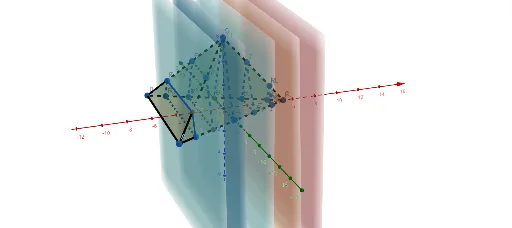
This GeoGebra example dynamically demonstrates how the cross-section of a triangular pyramid (tetrahedron) changes when cut by a vertical plane. The core mathematical concepts involve solid geometry, spatial plane intersections, and the properties of polyhedral sections. Construction highlights: using Point and Pyramid commands to define vertices A, B, C, D and faces/edges; employing Plane and IntersectPath to generate intersection lines between the cutting plane and pyramid faces, forming the section polygon; using PointIn and sliders to move the cutting plane for dynamic observation. Suitable for high school solid geometry lessons or introductory university spatial analytic geometry, this tool helps students visualize how section shapes evolve with plane position and enhances spatial reasoning skills.
GeoGebra Commands & Parameters
Point(xAxis) → CPoint(zAxis) → DPyramid(A, B, C, D) → a, faceABC, edgeCD, faceABD_1, faceBCD, faceACD, edgeAB, edgeBC, edgeAC, edgeAD, edgeBDPyramid(faceABD_1, A) → b, faceAAB, faceABD, faceAAD, edgeAA, edgeAB, edgeADIntersect(edgeAC, yAxis) → EIntersect(edgeBC, yAxis) → FPoint(edgeAC) → GPoint(edgeBC) → HPoint(edgeCD) → IPoint(edgeBD) → LPoint(edgeAD) → MPoint(edgeBC) → NPlane(L, M, N) → rIntersectPath(r, faceABD) → gIntersect(r, faceABD) → O, PIntersectPath(r, faceACD) → fIntersect(r, faceACD) → J, KIntersectPath(r, faceBCD) → hIntersect(r, faceBCD) → Q, RIntersectPath(r, a) → poly1, S, T, U, V, i, j, k, lPlane(G, H, I) → pIntersectPath(p, faceACD) → mIntersect(p, faceACD) → W, ZIntersectPath(p, a) → poly2, A_1, B_1, C_1, n, q, sIntersectPath(xOyPlane, faceBCD) → tIntersect(xOyPlane, faceBCD) → D_1, E_1Plane(E, D, F) → p_1IntersectPath(p_1, a) → poly3, F_1, G_1, H_1, c, d, ePoint(edgeCD) → I_1Point(t) → J_1Point(edgeAC) → K_1Plane(I_1, J_1, K_1) → q_1IntersectPath(q_1, faceBCD) → f_1Intersect(q_1, faceBCD) → L_1, M_1IntersectPath(q_1, a) → poly4, N_1, O_1, P_1, g_1, h_1, i_1Point(t) → Q_1Point(edgeAC) → R_1Plane(L, M, N) → r_1Point(yAxis) → S_1Plane(F, D, S_1) → p_2IntersectPath(p_2, a) → poly5, T_1, U_1, V_1, j_1, k_1, l_1PointIn(faceABD) → W_1Plane(Q_1, R_1, W_1) → q_2IntersectPath(q_2, b) → poly6, Z_1, A_2, m_1, n_1IntersectPath(q_2, a) → poly7, B_2, C_2, D_2, E_2, s_1, t_1, a_1, b_1
AI Drawing Prompt Reference
Draw a triangular pyramid and a vertical plane cutting through it to visualize the cross-section. Use a slider to dynamically change the plane's position and observe how the cross-section polygon changes. Start by constructing the pyramid with its four vertices and edges, then draw the intersection lines between the plane and the pyramid's faces to form the cross-section, and finally use the slider to animate the plane's movement and the resulting shape changes.
The prompt above was compiled from the original drawing commands and is for reference only.