
Addition Using the Make A Ten Strategy
Loading the math board and drawing, please wait…
In collections
Elementary School Applets
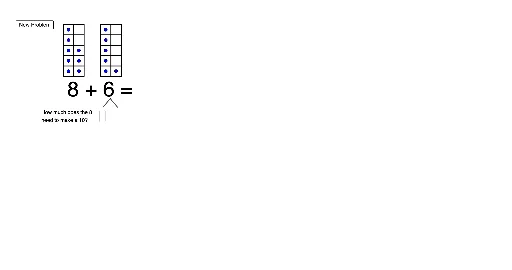
This example demonstrates how to use the Make A Ten strategy for addition within 20. Key math concepts include addition and the Make A Ten strategy. Using GeoGebra commands like Random, Flatten, and Sequence, dynamic graphics are constructed to help students understand the process of addition. Suitable for elementary school students in middle and lower grades.
GeoGebra Commands & Parameters
Random(0, 0) → seedTens2Random(2, 7) → seedOnes2Random(8, 9) → seedOnes1Random(0, 0) → seedTens1Flatten(Sequence[Sequence[Polygon[C + ((j * edge), (i * edge)), C + ((j * edge) + edge, (i * edge)), 4], i, 0, 4], j, 0, 1]) → Frame1Flatten(Sequence[Sequence[Polygon[D + ((j * edge), (i * edge)), D + ((j * edge) + edge, (i * edge)), 4], i, 0, 4], j, 0, 1]) → Frame2Sequence(Centroid[Element[Frame1, i]], i, 1, seedOnes1) → DotsShowingFrame1Sequence(Centroid[Element[Frame2, i]], i, 1, seedOnes2) → DotsShowingFrame2Flatten(Sequence[Centroid[Element[Frame1, i]], i, 1, 10]) → DotsHiddenFrame1Flatten(Sequence[Centroid[Element[Frame2, i]], i, 1, 10]) → DotsHiddenFrame2Translate(Element[DotsShowingFrame2, seedOnes2], Vector[(move1 * Vector[Element[DotsHiddenFrame2, seedOnes2], Element[DotsHiddenFrame1, seedOnes1 + 1]])]) → ETranslate(Element[DotsShowingFrame2, seedOnes2 - 1], Vector[(move2 * Vector[Element[DotsHiddenFrame2, seedOnes2 - 1], Element[DotsHiddenFrame1, seedOnes1 + 2]])]) → FTextfield(inputDotsToMove) → InputBox2Textfield(inputTotal) → InputBox1Sequence(Centroid[Element[Frame2, i]], i, 1, seedOnes2 - 1) → DotsShowingFrame1Minus1Sequence(Centroid[Element[Frame2, i]], i, 1, seedOnes2 - 2) → DotsShowingFrame1Minus2Segment(Q, R) → fSegment(R, S) → g
AI Drawing Prompt Reference
Draw an educational diagram demonstrating the 'Make a Ten' addition strategy. The scene includes two side-by-side ten-frames, each a 2 by 5 grid of small squares. The left frame contains dots representing the first addend, and the right frame contains dots for the second addend, with dot counts randomly chosen but ensuring the total is within 20. Arrows or translation vectors show some dots from the right frame moving to the left frame to fill it to ten, illustrating the regrouping process. Additionally, include two input boxes for entering the number of dots to move and the final total, and connect relevant elements with line segments. The layout is clear and suitable for elementary students to understand addition.
The prompt above was compiled from the original drawing commands and is for reference only.