
Addition of Two Complex Numbers (with Animation)
Loading the math board and drawing, please wait…
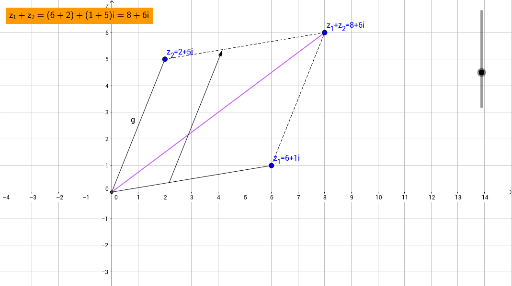
① This GeoGebra example dynamically demonstrates the geometric meaning of adding two complex numbers, applying the parallelogram law of vector addition on the complex plane. ② The core mathematical concepts are complex number addition, vector representation on the complex plane, and the geometric construction of vector sums. ③ Construction highlights: the Intersect command finds intersection points, Segment creates line segments, and Vector constructs vectors; objects include points A and B, vectors f and g, resulting vectors h, i, j, along with text1 and sliders t and u for animation control. ④ Suitable for high school or early college students learning complex numbers and vector geometry, and for teachers to visually explain the geometric essence of complex addition in class.
GeoGebra Commands & Parameters
Intersect(xAxis, yAxis) → BSegment(B, A) → fSegment(C, B) → gSegment(C, D) → hSegment(A, D) → iSegment(B, D) → jVector((0, 0) + (t * A), (0, 0) + (t * A) + C) → u
AI Drawing Prompt Reference
Draw the geometric addition of two vectors on the complex plane to demonstrate the parallelogram law. Start by plotting the intersection point of the coordinate axes. Draw vector OP from the origin to point P and vector OQ from the origin to point Q. Then, construct a parallelogram using OP and OQ as adjacent sides. The diagonal starting from the origin represents the sum of vectors OP and OQ. Use sliders to dynamically adjust the positions of points P and Q, observing the changes in the parallelogram and its diagonal to intuitively understand the geometric meaning of complex number addition.
The prompt above was compiled from the original drawing commands and is for reference only.