
Adding Integers (5.hf)
Loading the math board and drawing, please wait…
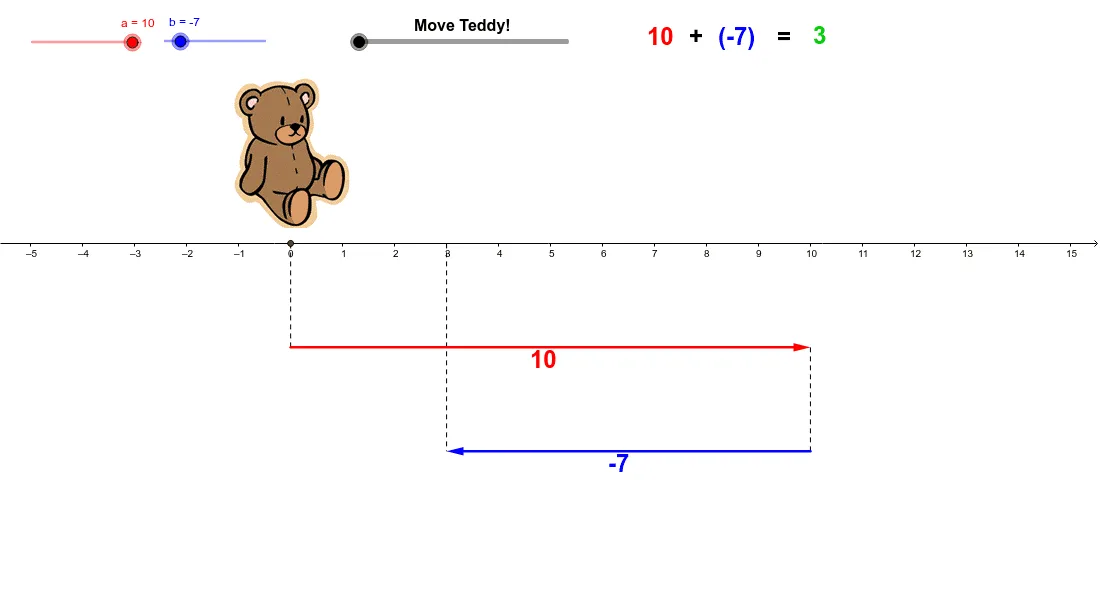
① This example demonstrates the addition of two integers using draggable sliders a and b, with a cute teddy bear animation to engage learners. ② The core mathematical concept is integer addition, including positive and negative numbers, vector representation on a number line, and an introduction to linear functions. ③ Construction details: The GeoGebra commands Vector and Segment are used to create vectors u and v representing the addends and the number line segments; the If command controls conditional display of results. Objects include sliders a and b, points A, B, C, multiple text labels (szöveg3–szöveg9), and images (kép1, kép2) that update dynamically to show the sum. ④ Suitable for upper elementary to middle school students, this interactive tool helps visualize the geometric meaning of integer addition and can be used for classroom demonstrations or self-paced exploration.
GeoGebra Commands & Parameters
Vector((0, -2), (a, (-2))) → uVector((a, (-4)), (a + b, (-4))) → vSegment(A, (a + b, (-4))) → cSegment((a, (-2)), (a, (-4))) → dSegment((0, 0), (0, -2)) → eIf(f < 1, ((f * a), 0), (a, 0) + ((f - 1) * (b, 0))) → D
AI Drawing Prompt Reference
Draw an integer number line with two draggable sliders representing addends. Use vectors to show their addition on the number line, and include an animation to demonstrate the result, covering both positive and negative integers, vector representation, and introducing linear functions.
The prompt above was compiled from the original drawing commands and is for reference only.