
Adding Fractions with Like Denominators
Loading the math board and drawing, please wait…
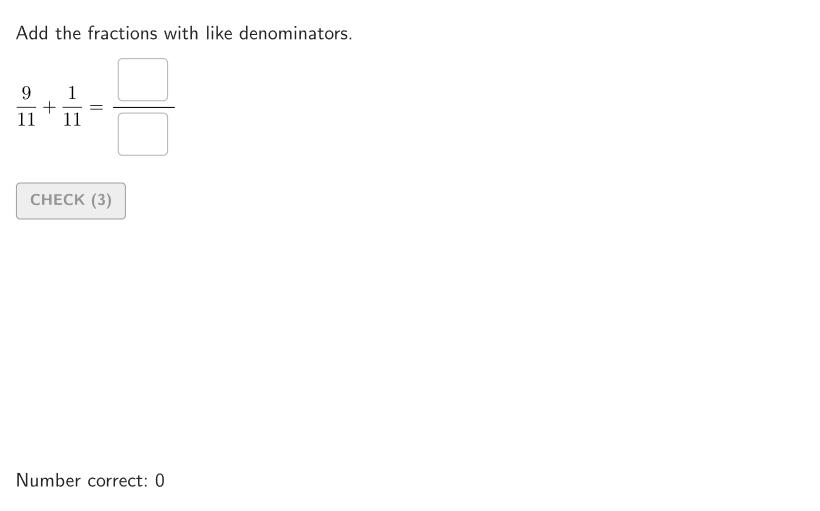
① This interactive GeoGebra activity demonstrates how to add fractions with like denominators using visual fraction models and randomized practice problems. ② The core math concept is adding fractions where only the numerators are summed while the denominator stays the same, including simple mixed numbers without regrouping. ③ Construction highlights: the applet uses commands such as Shuffle, Element, Sequence, and Take to generate random fraction pairs, Polygon and Segment to build visual fraction bars or area models, Textfield and Corner for input boxes and onboarding hints, plus sliders (aniSli) and buttons (btnValidate, btnNew) for interactive feedback and new problems. ④ Designed for grades 4-5 students and teachers, this verified resource supports Spanish translation and is suitable for classroom practice, homework, or direct instruction on fraction operations.
GeoGebra Commands & Parameters
Shuffle(Sequence[t, t, 5, 12]) → allDen, {11, 7, 9, 5, 8, 6, 12, 10}Element(allDen, Mod[countQuestion, Length[allDen]] + 1) → denShuffle(Sequence[t, t, 1, den - 1, 1]) → allNum1, {9, 7, 8, 3, 4, 6, 5, 2, 10, 1}Element(allNum1, Mod[countQuestion, Length[allNum1]] + 1) → num1Shuffle(Sequence[t, t, 1, den - num1, 1]) → allNum2, {1, 2}Element(allNum2, Mod[countQuestion, Length[allNum2]] + 1) → num2Sequence(Random[0, 99] / 100, A, 1, 200) → allRandomSeeds, {0.73, 0.19, 0.49, 0.52, 0.28, 0.01, 0.52, 0.69, 0.71, 0.35, 0.23, 0.59, 0.1, 0.64, 0.16, 0.34, 0.49, 0.7, 0.8, 0.47, 0.41, 0.55, 0.7, 0.89, 0.28, 0.22, 0.45, 0.7, 0.47, 0.82, 0.5, 0.15, 0.88, 0.04, 0.31, 0.42, 0.76, 0.06, 0.32, 0.56, 0.19, 0.05, 0.36, 0.64, 0.63, 0.95, 0.52, 0.86, 0.92, 0.98, 0.23, 0.78, 0.37, 0.1, 0.62, 0.17, 0.61, 0.42, 0.31, 0.98, 0.8, 0.51, 0.46, 0.31, 0.72, 0.52, 0.8, 0.01, 0.69, 0.25, 0.4, 0.03, 0.97, 0.83, 0.41, 0.07, 0.78, 0.38, 0.65, 0.76, 0.37, 0.6, 0.07, 0.12, 0.52, 0.66, 0.91, 0.04, 0.2, 0.68, 0.72, 0.3, 0.89, 0, 0.49, 0.39, 0.12, 0.84, 0.01, 0.99, 0.38, 0.38, 0, 0.94, 0.59, 0.7, 0.14, 0.01, 0.38, 0.48, 0.74, 0.74, 0.37, 0.06, 0.33, 0.33, 0.45, 0.73, 0.02, 0.77, 0.66, 0.6, 0.46, 0.55, 0.33, 0.51, 0.22, 0.25, 0.8, 0.79, 0.4, 0.82, 0.12, 0.81, 0.67, 0.02, 0.99, 0.69, 0.67, 0.26, 0.32, 0.36, 0.28, 0.26, 0.74, 0.23, 0.16, 0.31, 0.49, 0.85, 0.47, 0.6, 0.96, 0.03, 0.63, 0.92, 0.77, 0.02, 0.18, 0.15, 0.56, 0.05, 0.68, 0.75, 0.63, 0.38, 0.11, 0.09, 0.47, 0.08, 0.48, 0.25, 0.87, 0.43, 0.75, 0.87, 0.17, 0.52, 0.08, 0.88, 0.79, 0.68, 0.7, 0.73, 0.04, 0.76, 0.07, 0.9, 0.45, 0.22, 0.49, 0.52, 0.44, 0.87, 0.42, 0.41, 0.54, 0.41, 0.78, 0.05}Take(allRandomSeeds, randIndex, randIndex + numRandoms - 1) → currentRandomSeedsTextfield(input1) → InputBox1Textfield(input2) → InputBox2Corner(5) → layoutAppSizePointToPixels(Corner[onboardingDisplayText, 2], Corner[1], Corner[3], Corner[5]) → layoutOnboardingonboardingTextOffset(Corner[onboardingText, 1], Corner[onboardingText, 3], onboardingCase, Corner[1], Corner[3], Corner[5]) → OnboardingTextOffsetPolygon({F1, F1 + (((num1 * horSide)) / den, 0), F1 + (((num1 * horSide)) / den, vertSide), F1 + (0, vertSide)}) → frac1Sequence(Segment[F1 + ((t * horSide / den), 0), F1 + ((t * horSide / den), vertSide)], t, 1, den - 1) → vertDividers1Polygon({F1, F1 + (horSide, 0), F1 + (horSide, vertSide), F1 + (0, vertSide)}) → framePolygon({F1 + (((num1 * horSide)) / den, 0), F1 + (((num1 * horSide) + (num2 * horSide)) / den, 0), F1 + (((num1 * horSide) + (num2 * horSide)) / den, vertSide), F1 + (((num1 * horSide)) / den, vertSide)}) → frac2Segment(TL1, TL2) → topLineSegment(BLF1, BLF2) → bottomLine1Segment(BLF2, BLF3) → bottomLine2Segment(BLF1, BLF3) → bottomLineSum
AI Drawing Prompt Reference
Draw a graphic illustrating fraction addition. The graphic should include two fraction bars representing two fractions, with the same denominator. Each fraction bar consists of vertical and horizontal segments, where the horizontal segment length corresponds to the numerator, and the denominator sets the total length. The two fraction bars should be placed side by side with the same denominator. Additionally, draw a total fraction bar whose horizontal segment length equals the sum of the two numerators, with the same denominator. The graphic should also include input boxes and instructional text for interaction. Construction order: first determine the denominator and numerators, draw the two fraction bars, then draw the total fraction bar, and finally add the input boxes and text.
The prompt above was compiled from the original drawing commands and is for reference only.