
Add a Roof to the House
Loading the math board and drawing, please wait…
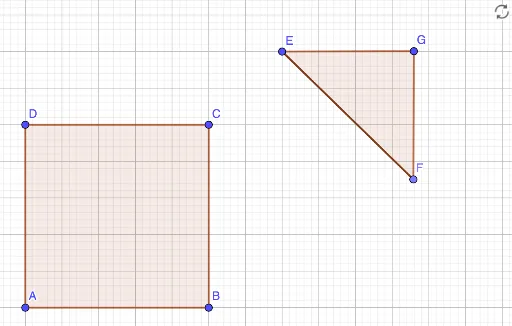
This example demonstrates how to construct a roof for a house using geometric transformations. The core math concepts involved include geometric transformations (rotation, translation), polygon construction, and coordinate system applications. Key construction steps use GeoGebra commands and objects like Polygon, Point, and Segment to build the roof and house outline. Suitable for middle school and above students to learn about geometric constructions and transformations.
GeoGebra Commands & Parameters
Polygon(A, B, C, D) → q1, a, b, c, dPoint(Circle[E, 5]) → FSegment(E, F) → fPolygon(E, F, G) → t1, g, e, f_1
AI Drawing Prompt Reference
Draw a quadrilateral as the main body of a house, connecting four vertices in order to form a closed rectangle. Then, pick a point near one of the top vertices of the rectangle, and draw a segment from that point to one of the rectangle's vertices, serving as the slanted edge of the roof. Next, construct a triangle using this segment and two other points, with the triangle's base coinciding with one side of the rectangle and its apex above, forming the roof shape. The overall figure consists of a rectangle with a triangle on top, showing how the roof is attached to the house through rotation and translation.
The prompt above was compiled from the original drawing commands and is for reference only.