
AAS Congruence Proof Step 3
Loading the math board and drawing, please wait…
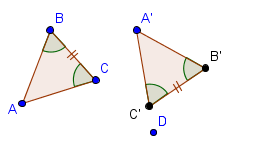
This example demonstrates the third step of the AAS congruence proof. The key mathematical concept involved is triangle congruence. Using GeoGebra commands such as Polygon, Angle, Ray, Rotate, Circle, and Intersect, the construction of triangle rotation and congruence proof is illustrated. Suitable for middle and high school students learning triangle congruence proof.
GeoGebra Commands & Parameters
Polygon(A, B, C) → poly1, c, a, bAngle(C, A, B) → αAngle(A, B, C) → βRay(A', D) → dRotate(A', α, A') → A''Rotate(D, α, A') → D'Ray(A'', D') → d'Circle(A', c) → eIntersect(e, d', 1) → B'Rotate(A', β, B') → A''_1Ray(B', A''_1) → fIntersect(d, f) → C'Polygon(A', B', C') → poly2, c', a', b'Angle(C', A', B') → α'Angle(A', B', C') → β'Angle(B', C', A') → γ'Angle(B, C, A) → γ
AI Drawing Prompt Reference
Draw a triangle with labeled angles and included side, then rotate the triangle around one vertex, rotate a ray using the new vertex and another vertex, find the intersection of a circle centered at the original vertex with the rotated ray, and rotate again using the new intersection point to complete the construction of two similar triangles.
The prompt above was compiled from the original drawing commands and is for reference only.