
Kaleidoscope Figure
Loading the math board and drawing, please wait…
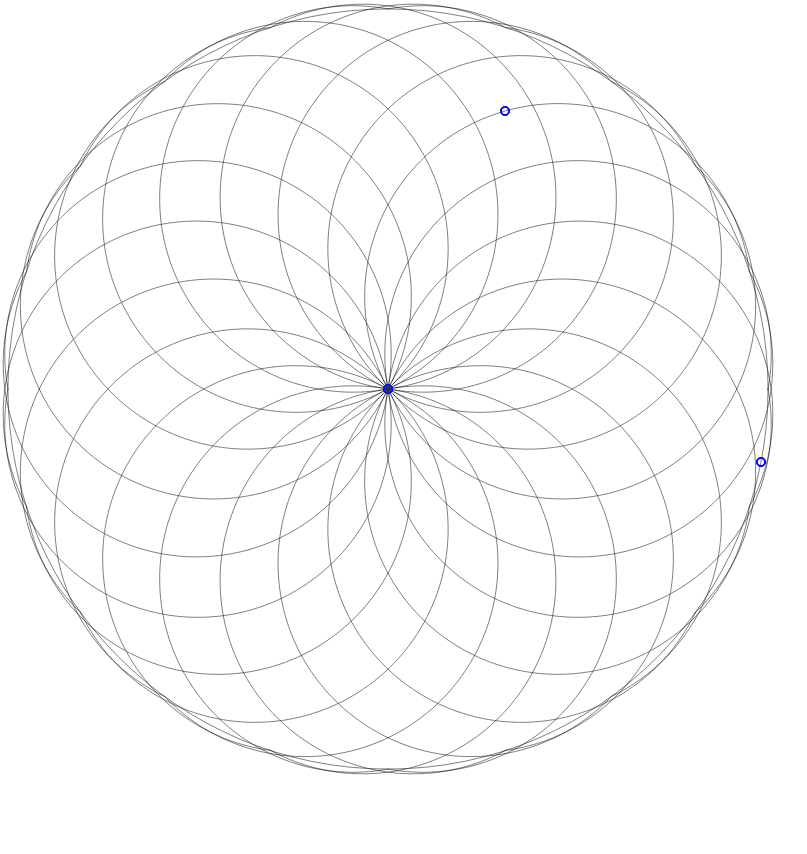
This kaleidoscopic figure allows students to modify the image by dragging points, then print it out and color it. It demonstrates symmetry principles based on circular constructions. Key math concepts include symmetry, circles, rotation, and geometric transformations. Construction highlights the use of GeoGebra commands and objects like Circle, Intersect, Rotate, CircumcircleArc, Line, and Mirror. Suitable for middle school and above for learning geometric constructions and symmetry.
GeoGebra Commands & Parameters
Circle(A, C) → dIntersect(d, xAxis, 2) → ERotate(E, 18*°, A) → E'Rotate(E', 18*°, A) → E''Rotate(E'', 18*°, A) → E'''Rotate(E''', 18*°, A) → FRotate(F, 18*°, A) → F'Rotate(F', 18*°, A) → F''Rotate(F'', 18*°, A) → F'''Rotate(F''', 18*°, A) → HRotate(H, 18*°, A) → H'Rotate(H', 18*°, A) → H''Rotate(H'', 18*°, A) → H'''Rotate(H''', 18*°, A) → JRotate(J, 18*°, A) → J'Rotate(J', 18*°, A) → J''Rotate(J'', 18*°, A) → J'''Rotate(J''', 18*°, A) → LRotate(L, 18*°, A) → L'Rotate(L', 18*°, A) → L''Rotate(L'', 18*°, A) → L'''CircumcircleArc(A, B, E') → eLine(E', A) → aMirror(B, a) → N'CircumcircleArc(A, N', E') → fRotate(B, 18*°, A) → N'_1Rotate(N'_1, 18*°, A) → ORotate(O, 18*°, A) → O'Rotate(O', 18*°, A) → O''Rotate(O'', 18*°, A) → O'''Rotate(O''', 18*°, A) → PRotate(P, 18*°, A) → P'Rotate(P', 18*°, A) → P''Rotate(P'', 18*°, A) → P'''Rotate(P''', 18*°, A) → QRotate(Q, 18*°, A) → Q'Rotate(Q', 18*°, A) → Q''Rotate(Q'', 18*°, A) → Q'''Rotate(Q''', 18*°, A) → RRotate(R, 18*°, A) → R'Rotate(R', 18*°, A) → R''Rotate(R'', 18*°, A) → R'''Rotate(R''', 18*°, A) → SRotate(S, 18*°, A) → S'CircumcircleArc(A, N'_1, E'') → gCircumcircleArc(A, O, E''') → hCircumcircleArc(A, O', F) → kCircumcircleArc(A, O'', F') → pCircumcircleArc(A, O''', F'') → qCircumcircleArc(A, P, F''') → rCircumcircleArc(A, P', H) → sCircumcircleArc(A, P'', H') → tCircumcircleArc(A, P''', H'') → c_1CircumcircleArc(A, Q, H''') → d_1CircumcircleArc(A, Q', J) → e_1CircumcircleArc(A, Q'', J') → f_1CircumcircleArc(A, Q''', J'') → g_1CircumcircleArc(A, R, J''') → h_1CircumcircleArc(A, R', L) → k_1CircumcircleArc(A, R'', L') → p_1CircumcircleArc(A, R''', L'') → q_1CircumcircleArc(A, S, L''') → r_1CircumcircleArc(A, S', E) → s_1Rotate(N', 18*°, A) → N''Rotate(N'', 18*°, A) → N'''Rotate(N''', 18*°, A) → B_1Rotate(B_1, 18*°, A) → B'Rotate(B', 18*°, A) → B''Rotate(B'', 18*°, A) → B'''Rotate(B''', 18*°, A) → DRotate(D, 18*°, A) → D'Rotate(D', 18*°, A) → D''Rotate(D'', 18*°, A) → D'''Rotate(D''', 18*°, A) → GRotate(G, 18*°, A) → G'Rotate(G', 18*°, A) → G''Rotate(G'', 18*°, A) → G'''Rotate(G''', 18*°, A) → IRotate(I, 18*°, A) → I'Rotate(I', 18*°, A) → I''Rotate(I'', 18*°, A) → I'''Rotate(I''', 18*°, A) → KCircumcircleArc(A, N'', E'') → cCircumcircleArc(A, N''', E''') → t_1CircumcircleArc(A, B_1, F) → c_2CircumcircleArc(A, B', F') → d_2CircumcircleArc(A, B'', F'') → e_2CircumcircleArc(A, B''', F''') → f_2CircumcircleArc(A, D, H) → g_2CircumcircleArc(A, D', H') → h_2CircumcircleArc(A, D'', H'') → k_2CircumcircleArc(A, D''', H''') → p_2CircumcircleArc(A, G, J) → q_2CircumcircleArc(A, G', J') → r_2CircumcircleArc(A, G'', J'') → s_2CircumcircleArc(A, G''', J''') → t_2CircumcircleArc(A, I, L) → c_3CircumcircleArc(A, I', L') → d_3CircumcircleArc(A, I'', L'') → e_3CircumcircleArc(A, I''', L''') → f_3CircumcircleArc(A, K, E) → g_3
AI Drawing Prompt Reference
Draw a kaleidoscopic pattern based on circles, creating symmetrical structures through rotation and reflection. Start from a central point, extend outward and rotate sequentially to generate multiple points, then use these points to draw circular arcs and connecting lines, forming a complex symmetrical design. The process emphasizes geometric transformations like rotation and reflection, showcasing multi-layered symmetry suitable for learning geometric constructions and symmetry principles.
The prompt above was compiled from the original drawing commands and is for reference only.