
A-Series Paper Ratio Demonstration
Loading the math board and drawing, please wait…
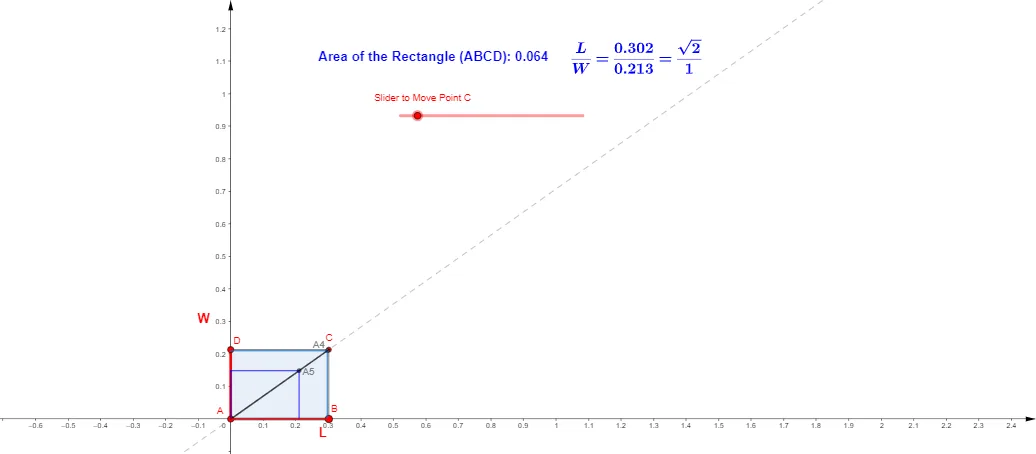
This example illustrates the dimensional ratio of A-series paper sizes, dynamically visualizing the side length proportions and area changes across different paper sizes. It involves core mathematical concepts such as ratios, sequences, polygon area calculations, and coordinate geometry. GeoGebra commands like IterationList, Sequence, Intersect, Polygon, Line, PointIn, and Segment are used to construct the paper sizes and calculate intersections. Suitable for high school mathematics instruction on ratios, sequences, geometric constructions, and as an extension in solid geometry for paper size analysis.
GeoGebra Commands & Parameters
IterationList({Element[v, 2], Element[v, 1] / 2}, v, {{sqrt(sqrt(2)), 1 / sqrt(sqrt(2))}}, N) → m1Sequence((Element[m1, i, 1], Element[m1, i, 2]), i, 1, N + 1) → l1Intersect(xAxis, yAxis) → APolygon(A, B, C, D) → q1, b1, a1, c, dLine(A, A0) → gPointIn(q1) → Pointq1Intersect(g, b1) → ESegment(A, C) → fPolygon((0, 0), (0, y(A5)), A5, (x(A5), 0)) → A5Rect, h, i, a5, jPolygon((0, 0), (0, y(A4)), A4, (x(A4), 0)) → A4Rect, k, l, a4, mPolygon((0, 0), (0, y(A3)), A3, (x(A3), 0)) → A3Rect, n, p, a3, qPolygon((0, 0), (0, y(A2)), A2, (x(A2), 0)) → A2Rect, r, s, a2, tPolygon((0, 0), (0, y(A1)), A1, (x(A1), 0)) → A1Rect, a, b, e, f_1Polygon((0, 0), (0, y(A0)), A0, (x(A0), 0)) → A0Rect, g_1, h_1, a0, i_1Segment(E, C) → j_1Segment(B, E) → h_2