
A Journey from Parabola to Conic Section
Loading the math board and drawing, please wait…
In collections
El dominio del Tiempo (cinemática intuitiva)
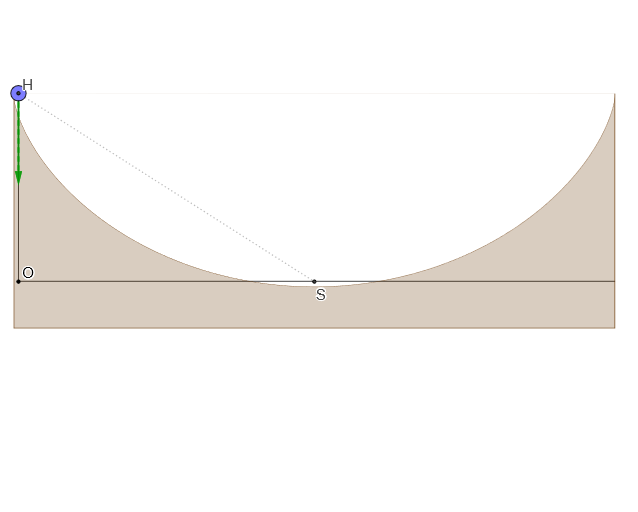
This example demonstrates the transformation from a parabola to a conic section. It involves geometric construction, curve parameterization, and properties of conic sections. Key mathematical concepts include parabolas, conic sections, parameterized curves, and geometric construction. The construction uses GeoGebra commands such as CurveCartesian, Point, If, mean, Tangent, UnitVector, Segment, Mirror, Locus. Suitable for high school mathematics, college mathematics, and mathematics education.
GeoGebra Commands & Parameters
CurveCartesian(((α * r), r) + (r; α + pi / 2), α, 0, (2 * pi)) → cPoint(c) → MIf(Length[reg] ≟ 1, {reg(1)}, Sequence[reg(k) - reg(k + 1), k, 1, Length[reg] - 1]) → regDifmean(regDif) → TTangent(M, c) → iUnitVector(i) → nSegment(M + g, M + gt) → jSegment(H, S) → fMirror(Hnor, Line[S, S + (0, 1)]) → Hnor'Locus(P, M) → lugar1
AI Drawing Prompt Reference
Draw a parametric curve to illustrate the transformation from a parabola to a conic section. Start by plotting a parabola and marking a point on it. Calculate the difference in distances between consecutive points, find the average, and identify a key point. Then, draw a tangent line and a unit vector from the point, construct new geometric objects using reflection and line segments, and trace the path of the key point to complete the conic section demonstration.
The prompt above was compiled from the original drawing commands and is for reference only.