
A Cube Composed of Six Pyramids
Loading the math board and drawing, please wait…
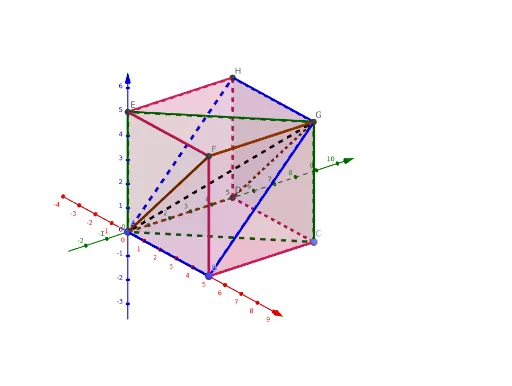
This example demonstrates how to construct six pyramids by cutting a cube, involving core math concepts like solid geometry, polygons, symmetry, and linear equations. It uses GeoGebra commands and objects such as Point, Cube, Polygon, and Segment, making it suitable for high school geometry education and learning.
GeoGebra Commands & Parameters
Point(Circle[B, Distance[A, B], Segment[A, B]]) → CCube(A, B, C) → a, D, faceCDHG, faceEFGH, edgeAD, edgeAB, edgeBC, edgeCD, edgeAE, edgeDH, edgeEH, edgeEF, E, edgeBF, edgeFG, edgeCG, edgeGH, F, G, H, faceABCD, faceADHE, faceABFE, faceBCGFPolygon(A, D, G, F) → q1, a_1, d, g, fPolygon(A, B, G, H) → q2, a_2, b, g_1, hPolygon(E, G, C, A) → q3, e, g_2, c, a_3Segment(A, G) → i
AI Drawing Prompt Reference
Start with a cube, using one base edge as a reference. Pick a point outside this edge such that its distances to the two endpoints equal the edge length, thus determining a vertex. Construct the cube from this vertex and the base edge, yielding six faces, twelve edges, and eight vertices. Next, from one vertex of the cube, draw a diagonal to the opposite vertex, forming a space diagonal. Then, using this diagonal, connect four vertices of the cube to create four triangular faces. These triangular faces, together with the cube's original faces, partition the cube into six square pyramids. The final figure shows a cube composed of six pyramids, highlighting symmetry and spatial division.
The prompt above was compiled from the original drawing commands and is for reference only.