
6X6 to 10 Pool Table Geometric Construction
Loading the math board and drawing, please wait…
In collections
Rate & Accumulation Yr 4 Much&Fast
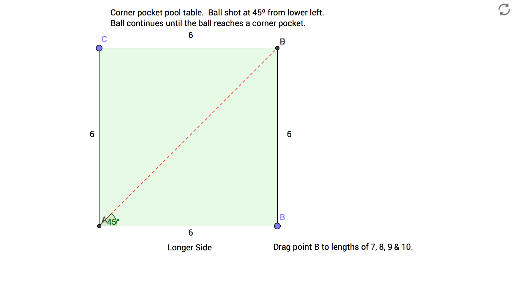
This example demonstrates the geometric construction of pool tables ranging from 6X6 to 10. Core mathematical concepts include polygons and geometric construction. Using GeoGebra commands such as Intersect, Point, and OrthogonalLine, the geometric shape of the pool table can be constructed. Suitable for students at the junior high school level and above to learn about polygon-related knowledge and geometric construction.
GeoGebra Commands & Parameters
Intersect(xAxis, yAxis) → APoint(xAxis) → BPoint(yAxis) → COrthogonalLine(C, yAxis) → fOrthogonalLine(B, xAxis) → gIntersect(g, f) → DPolygon(A, B, D, C) → poly1, a, b, d, cRotate(B, 45°, A) → B'Angle(B, A, B') → αLine(A, B') → hIntersect(h, d) → ESegment(A, E) → iRotate(A, 45°, E) → A'Rotate(D, (-(45°)), E) → D'Angle(D', E, D) → βLine(E, D') → jIntersect(j, b) → FSegment(E, F) → kRotate(B, (-(45°)), F) → B'_1Angle(B'_1, F, B) → γLine(F, B'_1) → lIntersect(l, a) → GSegment(F, G) → mRotate(A, (-(45°)), G) → A'_1Angle(A'_1, G, A) → δLine(G, A'_1) → nIntersect(n, d) → HSegment(G, H) → pRotate(C, 45°, H) → C'Angle(C, H, C') → εLine(H, C') → qIntersect(q, c) → ISegment(H, I) → rRotate(A, 45°, I) → A'_2Angle(A, I, A'_2) → ζLine(I, A'_2) → sIntersect(s, a) → JSegment(I, J) → tRotate(B, 45°, J) → B'_2Angle(B, J, B'_2) → ηLine(J, B'_2) → eRay(G, A'_1) → g_1Intersect(g_1, c) → KSegment(G, K) → h_1Rotate(C, (-(45°)), K) → C'_1Angle(C'_1, K, C) → θRay(K, C'_1) → i_1Intersect(d, i_1) → LSegment(K, L) → j_1Rotate(E, (-(45°)), L) → E'Angle(E', L, E) → ιRay(L, E') → k_1Intersect(b, k_1) → MSegment(L, M) → l_1Rotate(B, (-(45°)), M) → B'_3Angle(B'_3, M, B) → κRay(M, B'_3) → m_1Intersect(m_1, a) → NSegment(M, N) → n_1Rotate(A, (-(45°)), N) → A'_3Angle(A'_3, N, A) → λRay(N, A'_3) → p_1Intersect(c, p_1) → OSegment(N, O) → q_1Rotate(C, (-(45°)), O) → C'_2Angle(C'_2, O, C) → μRay(O, C'_2) → r_1Intersect(d, r_1) → PSegment(O, P) → s_1Rotate(D, (-(45°)), P) → D'_1Angle(D'_1, P, D) → νRay(P, D'_1) → f_1Intersect(b, f_1) → QSegment(P, Q) → t_1Ray(J, B'_2) → b_1Ray(J, B'_2) → a_1Intersect(b, a_1) → RSegment(J, R) → c_1Rotate(B, (-(45°)), Q) → B'_4Angle(B'_4, Q, B) → ξRay(Q, B'_4) → d_1Intersect(d_1, a) → SSegment(Q, S) → e_1Rotate(A, (-(45°)), S) → A'_4Angle(A'_4, S, A) → οRay(S, A'_4) → f_2Intersect(c, f_2) → TSegment(S, T) → g_2
AI Drawing Prompt Reference
Construct a pool table ranging from 6x6 to 10. Start by defining four vertices A, B, C, and D on the coordinate axes, then use rotations and intersections to create a series of lines and angles, ultimately forming a regular polygon. Pay attention to the angles and line intersections to ensure each step is accurate.
The prompt above was compiled from the original drawing commands and is for reference only.