
3D Vectors and Euler Angles Visualization
Loading the math board and drawing, please wait…
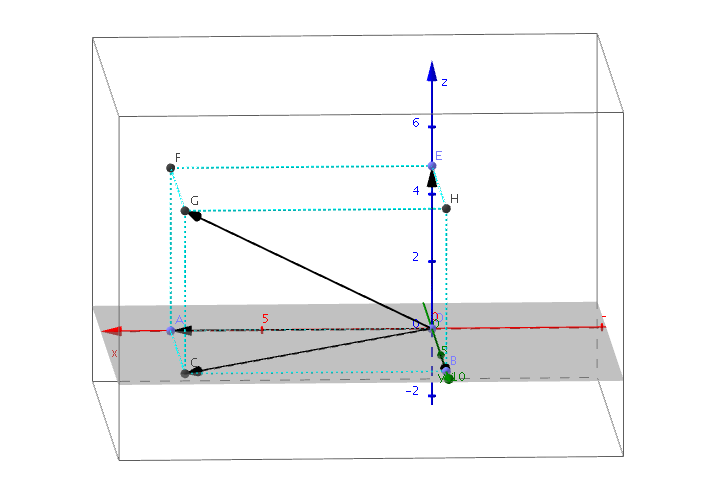
This example demonstrates the visualization of 3D vectors and Euler angles. It involves core mathematical concepts like 3D vectors, Euler angles, coordinate geometry, and solid geometry. Construction highlights include commands and objects such as Point, OrthogonalLine, Intersect, Vector, Polygon, Prism, and Angle. Suitable for high school students and learners needing spatial geometry visualization.
GeoGebra Commands & Parameters
Point(xAxis) → APoint(yAxis) → BOrthogonalLine(A, xAxis) → a_2OrthogonalLine(B, yAxis) → bIntersect(a_2, b) → CPoint(yAxis) → DVector(D, C) → uVector(D, A) → vVector(D, B) → wPolygon(D, A, C, B) → poly1, d, a_1, c, b_1Point(zAxis) → EPrism(poly1, E) → e, F, edgeAF, edgeCG, edgeBH, edgeEF, edgeFG, edgeGH, edgeEH, G, H, faceADEF, faceACGF, faceBCGH, faceBDEH, faceEFGH, edgeDEVector(D, G) → aVector(D, E) → gPoint(xAxis) → IAngle(I, D, C) → ϕPoint(zAxis) → JAngle(J, D, G) → θ
AI Drawing Prompt Reference
Visualize 3D vectors and Euler angles by drawing coordinate axes and creating lines perpendicular to the x and y axes. The intersection of these lines forms a triangle. Draw vectors from a point on the y-axis to each vertex of the triangle, and extend the triangle upward to create a prism. Then, draw vectors from the y-axis point to the triangle's and prism's vertices, labeling the angles between the x-axis and the triangle's and prism's edges as Euler angles.
The prompt above was compiled from the original drawing commands and is for reference only.