
3D Vector Exploration
Loading the math board and drawing, please wait…
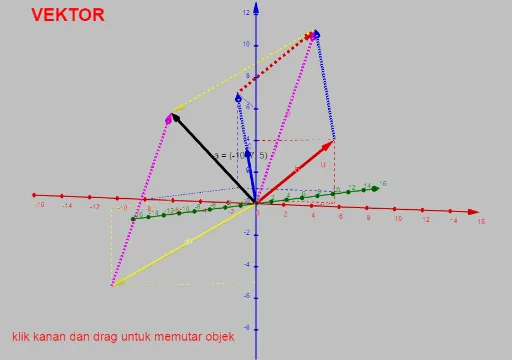
This example demonstrates vectors in three-dimensional space. Key mathematical concepts include vector addition, subtraction, dot product, and cross product. Using GeoGebra commands such as Vector, Translate, and Line, the geometric meaning and operations of vectors are visually illustrated. Suitable for high school and above students to learn about 3D vectors.
GeoGebra Commands & Parameters
Vector(A) → uVector(B) → vVector(C) → wTextfield(k) → InputBox1Textfield(l) → InputBox2Textfield(m) → InputBox3Translate(D, c) → D'Vector(D, D') → fTranslate(E, b) → E'Vector(E, E') → gTranslate(E', d) → E''Vector(E', E'') → hTranslate(F, e) → F'Vector(F, F') → iTextfield(x1) → InputBox4Textfield(y1) → InputBox5Textfield(z1) → InputBox6Textfield(x2) → InputBox7Textfield(y2) → InputBox8Textfield(z2) → InputBox9Textfield(x3) → InputBox10Textfield(y3) → InputBox11Line(G, v) → rOrthogonalLine(A, r, space) → sIntersect(s, r) → IVector(I) → pSegment(A, I) → f_1OrthogonalLine(A, o) → g_1OrthogonalLine(B, o) → h_1OrthogonalLine(C, o) → i_1OrthogonalLine(C, zAxis, space) → j_1OrthogonalLine(B, zAxis, space) → k_1OrthogonalLine(A, zAxis, space) → l_1Intersect(g_1, o) → JIntersect(h_1, o) → KIntersect(i_1, o) → LSegment(A, J) → m_1Segment(B, K) → n_1Segment(C, L) → p_1Intersect(k_1, zAxis) → MIntersect(l_1, zAxis) → NIntersect(j_1, zAxis) → OSegment(A, N) → q_1Segment(B, M) → r_1Segment(C, O) → s_1OrthogonalLine(J, xAxis, space) → t_1OrthogonalLine(J, yAxis, space) → a_1OrthogonalLine(K, yAxis, space) → b_1OrthogonalLine(K, xAxis, space) → c_1OrthogonalLine(L, yAxis, space) → d_1OrthogonalLine(L, xAxis, space) → e_1Intersect(yAxis, d_1) → PIntersect(a_1, yAxis) → QIntersect(b_1, yAxis) → RIntersect(xAxis, t_1) → SIntersect(c_1, xAxis) → TIntersect(e_1, xAxis) → USegment(L, U) → f_2Segment(L, P) → g_2Segment(K, R) → h_2Segment(K, T) → i_2Segment(J, S) → j_2Segment(J, Q) → k_2OrthogonalLine(D, o) → l_2OrthogonalLine(E, o) → m_2OrthogonalLine(F, o) → n_2OrthogonalLine(D, zAxis, space) → p_2OrthogonalLine(E, zAxis, space) → q_2OrthogonalLine(F, zAxis, space) → r_2Intersect(p_2, zAxis) → VIntersect(q_2, zAxis) → WIntersect(r_2, zAxis) → ZIntersect(l_2, o) → A_1Intersect(m_2, o) → B_1Intersect(n_2, o) → C_1OrthogonalLine(A_1, xAxis, space) → s_2OrthogonalLine(B_1, xAxis, space) → t_2OrthogonalLine(C_1, xAxis, space) → a_2OrthogonalLine(A_1, yAxis, space) → b_2OrthogonalLine(B_1, yAxis, space) → c_2OrthogonalLine(C_1, yAxis, space) → d_2Intersect(s_2, xAxis) → D_1Intersect(t_2, xAxis) → E_1Intersect(a_2, xAxis) → F_1Intersect(b_2, yAxis) → G_1Intersect(c_2, yAxis) → H_1Intersect(d_2, yAxis) → I_1Segment(D, V) → e_2Segment(D, A_1) → f_3Segment(A_1, D_1) → g_3Segment(A_1, G_1) → h_3Segment(E, W) → i_3Segment(E, B_1) → j_3Segment(B_1, H_1) → k_3Segment(B_1, E_1) → l_3Segment(F, Z) → m_3Segment(F, C_1) → n_3Segment(C_1, I_1) → p_3Segment(C_1, F_1) → q_3Textfield(z3) → InputBox12
AI Drawing Prompt Reference
Draw vectors in 3D space and their operations. Start by creating three vectors u, v, and w, then generate new vectors f, g, h, and i through translation and vector operations. Input coordinates x1, y1, z1, etc., to construct points and lines, and use their intersections to generate new vectors and segments, ultimately showing vector addition, subtraction, dot product, and cross product.
The prompt above was compiled from the original drawing commands and is for reference only.