
3D Pyramid Construction in GeoGebra
Loading the math board and drawing, please wait…
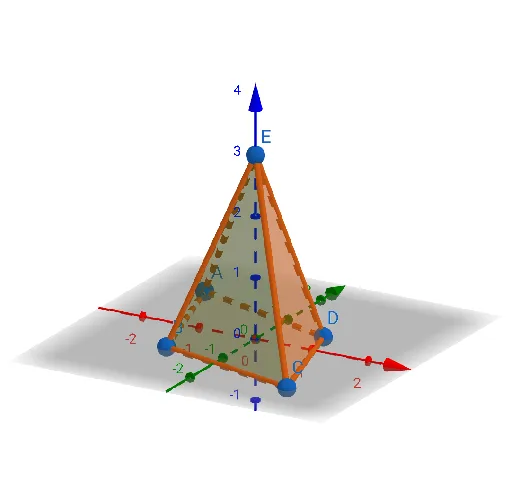
①This example demonstrates a three-dimensional pyramid (triangular-based pyramid) constructed from five points A, B, C, D, E in GeoGebra's 3D view, showing the base and lateral faces clearly. ②The core mathematical concept is solid geometry, specifically the structure of a polyhedron: a quadrilateral base (ABCD) and four triangular lateral faces connecting the apex E to each base vertex, along with edges and faces as fundamental elements. ③Construction details: The Point command creates five free points, and the Pyramid command uses these points to generate the pyramid; the construction summary lists face objects (faceABCD, faceABE, etc.) and edge objects (edgeAB, edgeBC, etc.), indicating that all faces and edges are automatically generated for further measurement or dynamic adjustment. ④This is suitable for middle or high school solid geometry lessons, or for beginners learning 3D construction, and can be used to explore properties like volume and surface area.
GeoGebra Commands & Parameters
Point(zAxis) → EPyramid(A, B, C, D, E) → a, faceABCD, edgeAE, edgeBE, edgeCE, edgeDE, faceABE, faceBCE, faceCDE, faceADE, edgeAB, edgeBC, edgeCD, edgeAD
AI Drawing Prompt Reference
Create a 3D pyramid with a quadrilateral base and an apex point. Connect the apex to each of the four base vertices to form four triangular lateral faces. Ensure all edges and faces are clearly visible, displaying the complete geometric structure of a solid pyramid suitable for exploring volume and surface area properties.
The prompt above was compiled from the original drawing commands and is for reference only.