
3D Magic Star Animation
Loading the math board and drawing, please wait…
In collections
Action Modular Origami
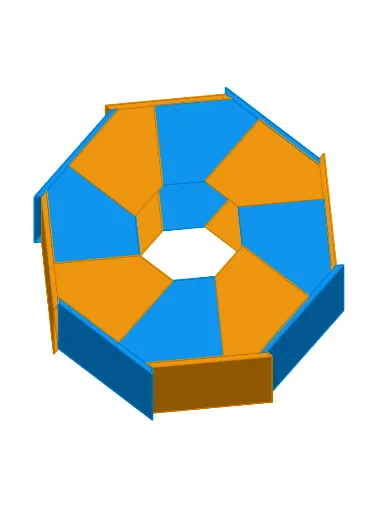
This example demonstrates an animated 3D model of a magic star folded from paper, as described in the book 'Action Modular Origami'. It involves core mathematical concepts such as solid geometry, transformations, polygons, and vectors. The construction utilizes GeoGebra commands and objects like Rotate, Polygon, Intersect, Line, OrthogonalLine, Vector, Translate, Point, Dilate, and Sequence. Suitable for high school students and above to learn about 3D shapes and transformations, or for mathematical education purposes.
GeoGebra Commands & Parameters
Rotate(F, (-(45°)), F) → F'_1Rotate(C, (-(45°)), F) → C'_1Rotate(E, (-(45°)), F) → E'_1Rotate(D, (-(45°)), F) → D'_1Polygon(C'_1, D'_1, E'_1, F'_1) → poly1'_1, c'_1, d'_1, e'_1, f'_1Polygon(C, D, E, F) → poly1, c, d, e, fIntersect(e, d'_1) → WIntersect(d, d'_1) → VIntersect(xAxis, yAxis) → ALine(A, B) → aOrthogonalLine(F, a) → bRotate(a, α / 2, A) → a'Intersect(a', b) → HVector(F, H) → uTranslate(V, u) → V'Translate(W, u) → W'Translate(F, u) → F'Translate(D, u) → D'Translate(C, u) → C'Point(a') → UDilate(U, fac, A) → U'Translate(E, u) → E'Polygon(C', D', V', W', F') → poly1', g, h, a_1, b_1, c_1Vector(A, G) → vTranslate(C', v) → C''Translate(D', v) → D''Translate(E', v) → E''Translate(F', v) → F''Polygon(C'', D'', E'', F'') → poly1'', c'', d'', e'', f''Rotate(C'', α, A) → C'''_1Rotate(D'', α, A) → D'''_1Rotate(E'', α, A) → E'''_1Rotate(F'', α, A) → F'''_1Polygon(C'''_1, D'''_1, E'''_1, F'''_1) → poly1'''_1, c''', d''', e''', f'''Rotate(C'', (2 * α), A) → C'''_2Rotate(D'', (2 * α), A) → D'''_2Rotate(E'', (2 * α), A) → E'''_2Rotate(F'', (2 * α), A) → F'''_2Polygon(C'''_2, D'''_2, E'''_2, F'''_2) → poly1'''_2, c'''_1, d'''_1, e'''_1, f'''_1Rotate(C'''_1, (2 * α), A) → IRotate(D'''_1, (2 * α), A) → JRotate(E'''_1, (2 * α), A) → KRotate(F'''_1, (2 * α), A) → LPolygon(I, J, K, L) → poly2, i, j, k, lRotate(C'', (4 * α), A) → C'''_3Rotate(D'', (4 * α), A) → D'''_3Rotate(E'', (4 * α), A) → E'''_3Rotate(F'', (4 * α), A) → F'''_3Polygon(C'''_3, D'''_3, E'''_3, F'''_3) → poly1'''_3, c'''_2, d'''_2, e'''_2, f'''_2Rotate(C'''_1, (4 * α), A) → MRotate(D'''_1, (4 * α), A) → NRotate(E'''_1, (4 * α), A) → ORotate(F'''_1, (4 * α), A) → PPolygon(M, N, O, P) → poly3, m, n, o, pRotate(C'', (6 * α), A) → C'''Rotate(D'', (6 * α), A) → D'''Rotate(E'', (6 * α), A) → E'''Rotate(F'', (6 * α), A) → F'''Polygon(C''', D''', E''', F''') → poly1''', c'''_3, d'''_3, e'''_3, f'''_3Rotate(C'''_1, (6 * α), A) → QRotate(D'''_1, (6 * α), A) → RRotate(E'''_1, (6 * α), A) → SRotate(F'''_1, (6 * α), A) → TPolygon(Q, R, S, T) → poly4, q, r, s, tTranslate(V', v) → V''Translate(W', v) → W''Polygon(C'', D'', V'', W'', F'') → polyPiece, c''_1, d''_1, v'', w'', f''_1Sequence(Polygon[Rotate[C'', ((2 * n) * α), A], Rotate[D'', ((2 * n) * α), A], Rotate[V'', ((2 * n) * α), A], Rotate[W'', ((2 * n) * α), A], Rotate[F'', ((2 * n) * α), A]], n, 0, 3, 1) → ListPoly1Sequence(Polygon[Rotate[C'', α + ((2 * n) * α), A], Rotate[D'', α + ((2 * n) * α), A], Rotate[V'', α + ((2 * n) * α), A], Rotate[W'', α + ((2 * n) * α), A], Rotate[F'', α + ((2 * n) * α), A]], n, 0, 3, 1) → ListPoly2Vector(A, A') → wTranslate(I, w) → I'Translate(J, w) → J'Polygon(J, J', I', I) → polySide, j_1, j', i', i_1Sequence(Rotate[polySide, α + ((2 * n) * α), A], n, 0, 3, 1) → ListPolySide1Sequence(Rotate[polySide, ((2 * n) * α), A], n, 0, 3, 1) → ListPolySide2Polygon(Q, R, V'', D'') → polyThin, q_1, r_1, v''_1, d''_2Polygon(F'', W'', V'', D'', C'') → poly6, f''_2, w''_1, v''_2, d''_3, c''_2Rotate(F'', (-α), A) → F'''_4Rotate(W'', (-α), A) → W'''Rotate(V'', (-α), A) → V'''Rotate(D'', (-α), A) → D'''_4Rotate(C'', (-α), A) → C'''_4Polygon(F'''_4, W''', V''', D'''_4, C'''_4) → poly6', f'''_4, w''', v''', d'''_4, c'''_4OrthogonalLine(F'''_1, c''_2) → f_1Intersect(f_1, v''_1) → ZPolygon(F'', W'', V'', Z, F'''_1) → poly7, f''_3, w''_2, v''_3, z_1, f'''_5Rotate(F'', α, A) → F'''_5Rotate(W'', α, A) → W'''_1Rotate(V'', α, A) → V'''_1Rotate(Z, α, A) → Z'Rotate(F'''_1, α, A) → A_1Polygon(F'''_5, W'''_1, V'''_1, Z', A_1) → polyFat, f'''_6, w'''_1, v'''_1, z', a_2Sequence(Polygon[Rotate[Q, ((2 * n) * α), A], Rotate[R, ((2 * n) * α), A], Rotate[V'', ((2 * n) * α), A], Rotate[D'', ((2 * n) * α), A]], n, 0, 3, 1) → ListPolyThin2Sequence(Polygon[Rotate[Q, α + ((2 * n) * α), A], Rotate[R, α + ((2 * n) * α), A], Rotate[V'', α + ((2 * n) * α), A], Rotate[D'', α + ((2 * n) * α), A]], n, 0, 3, 1) → ListPolyThin1Sequence(Polygon[Rotate[F'''_5, α + ((2 * n) * α), A], Rotate[W'''_1, α + ((2 * n) * α), A], Rotate[V'''_1, α + ((2 * n) * α), A], Rotate[Z', α + ((2 * n) * α), A], Rotate[A_1, α + ((2 * n) * α), A]], n, 0, 3, 1) → ListPolyFat1Sequence(Polygon[Rotate[F'''_5, ((2 * n) * α), A], Rotate[W'''_1, ((2 * n) * α), A], Rotate[V'''_1, ((2 * n) * α), A], Rotate[Z', ((2 * n) * α), A], Rotate[A_1, ((2 * n) * α), A]], n, 0, 3, 1) → ListPolyFat2Translate(ListPolyFat1, w) → ListPolyFat1'Translate(ListPolyThin2, w) → ListPolyThin2'Translate(ListPolyThin1, w) → ListPolyThin1'Translate(ListPolyFat2, w) → ListPolyFat2'
AI Drawing Prompt Reference
Create a 3D magic star origami animation by first constructing a regular hexagon, then rotating its vertices around a point to generate new vertices. Next, use these vertices to form new polygons, creating the 3D structure of the magic star. Finally, rotate these polygons around the center point to create an animation effect.
The prompt above was compiled from the original drawing commands and is for reference only.