
3D Geometry Demonstration
Loading the math board and drawing, please wait…
In collections
Triangle Congruence Investigations
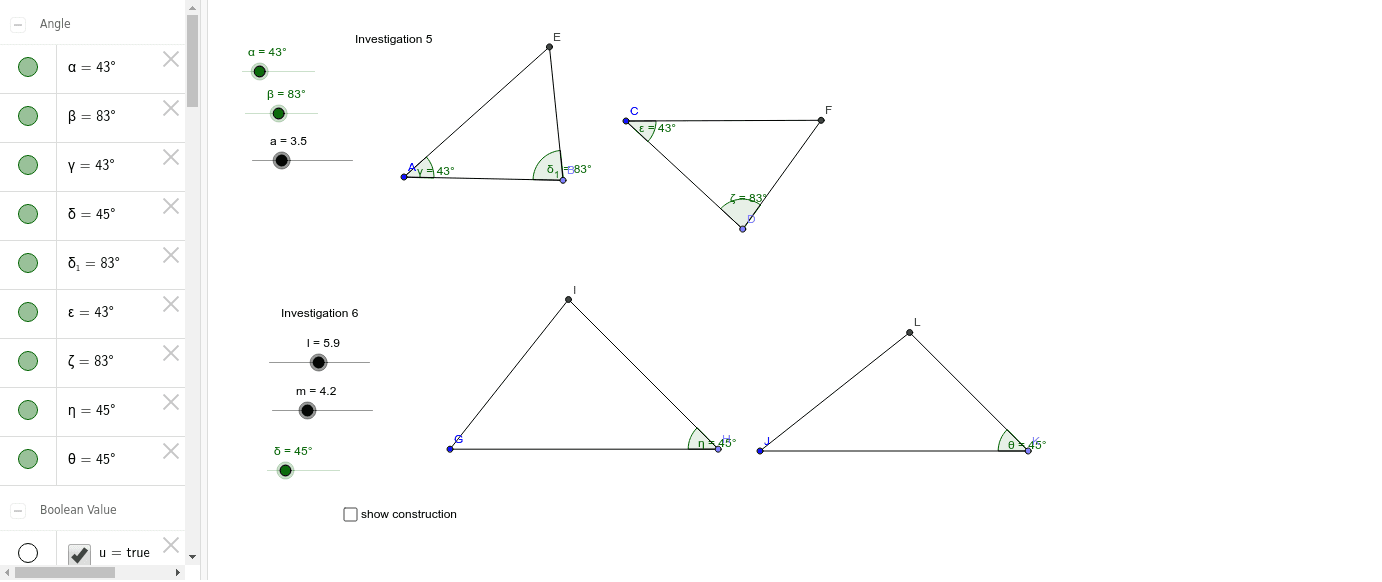
This example demonstrates the construction and transformation of three-dimensional shapes. It involves core mathematical concepts such as solid geometry, matrix operations, vector transformations, and angle calculations. Key GeoGebra commands and objects used include Point, Segment, Rotate, Angle, Ray, Intersect, and Circle for geometric construction and manipulation. Suitable for high school students and math enthusiasts learning solid geometry and matrix applications.
GeoGebra Commands & Parameters
Point(Circle[A, abs(a)]) → BSegment(A, B) → bPoint(Circle[C, abs(a)]) → DSegment(C, D) → cRotate(B, α, A) → B'Angle(B, A, B') → γRotate(A, (-β), B) → A'Angle(A', B, A) → δ_1Rotate(D, α, C) → D'Angle(D, C, D') → εRotate(C, (-β), D) → C'Angle(C', D, C) → ζRay(A, B') → dRay(B, A') → eIntersect(d, e) → ERay(C, D') → fRay(D, C') → gIntersect(f, g) → FSegment(A, E) → hSegment(E, B) → iSegment(C, F) → jSegment(F, D) → kPoint(Circle[G, abs(l)]) → HSegment(G, H) → nRotate(G, (-δ), H) → G'Angle(G', H, G) → ηRay(H, G') → pCircle(G, m) → qIntersect(q, p, 1) → ISegment(I, G) → rSegment(I, H) → sPoint(Circle[J, abs(l)]) → KSegment(J, K) → tRotate(J, (-δ), K) → J'Angle(J', K, J) → θRay(K, J') → a_1Circle(J, m) → d_1Intersect(d_1, a_1, 1) → LSegment(J, L) → e_1Segment(L, K) → f_1Intersect(d_1, a_1, 2) → MSegment(J, M) → g_1
AI Drawing Prompt Reference
Create a 3D geometric shape to demonstrate its construction and transformation. Start by drawing two circles and marking points on them, then connect these points with line segments. Perform rotations and calculate angles to generate new points and segments. Use rays and find intersections to determine key positions, forming closed polygons. Add additional circles and rays to create a complex geometric structure, fully showcasing the construction and transformation of the 3D shape.
The prompt above was compiled from the original drawing commands and is for reference only.