
Investigating Triangle Congruence Conditions Part 1
Loading the math board and drawing, please wait…
In collections
Triangle Congruence Investigations
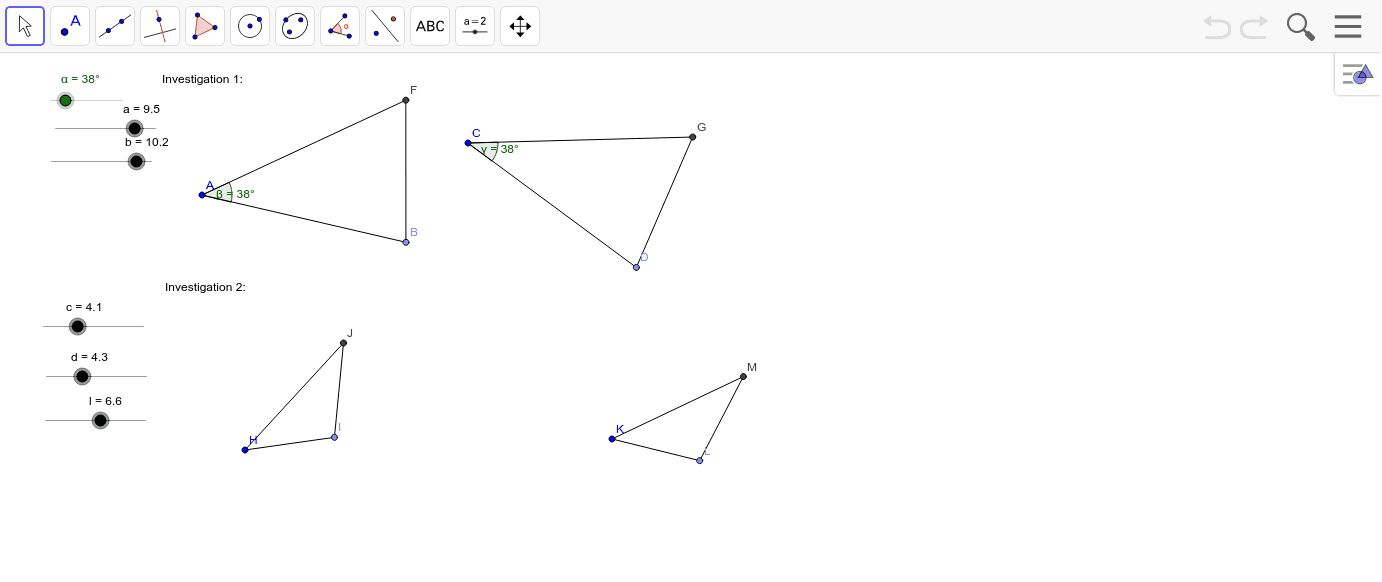
This example demonstrates how students can manipulate sliders to change combinations of angles and sides in triangles to determine necessary conditions for proving triangle congruence. It involves core math concepts like triangle congruence theorems, geometric transformations, and relationships between angles and sides. Constructed using GeoGebra commands/objects such as Point, Segment, Rotate, Angle, Ray, Circle, and Intersect. Suitable for high school students or teachers exploring and validating geometric theorems to deepen understanding of triangle congruence conditions.
GeoGebra Commands & Parameters
Point(Circle[A, abs(a)]) → BSegment(A, B) → b_1Point(Circle[C, abs(a)]) → DSegment(C, D) → c_2Rotate(B, α, A) → B'Angle(B, A, B') → βRotate(D, α, C) → D'Angle(D, C, D') → γRay(A, B') → d_1Ray(C, D') → eCircle(A, b) → fCircle(C, b) → gIntersect(f, d_1, 1) → FSegment(F, A) → hIntersect(g, e, 1) → GSegment(G, C) → iSegment(F, B) → jSegment(G, D) → kCircle(H, c) → pPoint(p) → ICircle(I, d) → qCircle(H, l) → rSegment(H, I) → mIntersect(q, r, 2) → JSegment(H, J) → nSegment(J, I) → sCircle(K, c) → tPoint(t) → LCircle(L, d) → e_1Circle(K, l) → f_1Intersect(e_1, f_1, 2) → MSegment(K, M) → a_1Segment(L, M) → g_1Segment(K, L) → h_1
AI Drawing Prompt Reference
Draw a triangle with sliders to change two angles and one side length, demonstrating conditions for triangle congruence. Start by drawing two fixed points and a line segment as one side of the triangle, then rotate these points and the segment based on slider values to form two new triangles. Next, draw circles centered at the vertices of these new triangles with radii equal to the original side, find their intersections with corresponding rays, and connect these points to form new triangles, observing if they are congruent.
The prompt above was compiled from the original drawing commands and is for reference only.