
3D Ellipse
Loading the math board and drawing, please wait…
In collections
circles, ovals, ellipses and architecture
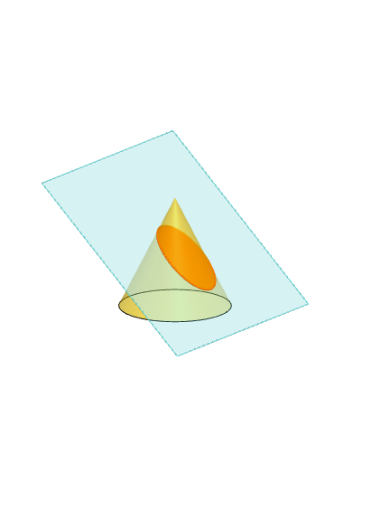
This example demonstrates an ellipse in 3D space. Key mathematical concepts include the geometric properties of ellipses and their representation in 3D coordinate systems. Using GeoGebra commands such as Polygon, PointIn, Translate, and Rotate, a 3D ellipse can be constructed. Suitable for high school mathematics education and learning.
GeoGebra Commands & Parameters
Polygon(B + (-2, -2), B + (2, -2), B + (2, 2), B + (-2, 2)) → poly3, e, f, g, iPointIn(poly3) → CTranslate((0, 0, 0), Vector[B, C]) → APolygon(A + (-4, -4), A + (4, -4), A + (4, 4), A + (-4, 4)) → poly1, a, b, c, dRotate(Rotate[Translate[poly1, Vector[A, A + (0, 0, h)]], (90° * s), A + (0, 0, h), yAxis], (90° * t), A, zAxis) → poly2Rotate(D, 120°, (0, 0, 0)) → ECone((0, 0, 0), (0, 0, 4), 2) → m, e_1, oPolygon(D, E, 3, xOyPlane) → poly4, j, k, l, FPointIn(poly2) → GPointIn(poly2) → HPointIn(poly2) → IPlane(G, I, H) → nIntersectPath(n, m) → poly6OrthogonalLine(A, n) → d_1Ends(m) → g_1, g_1_1Mirror(m, T) → m'QuadricSide(m') → o'IntersectPath(n, m') → f_1Ends(m') → h_1, h_1_1
AI Drawing Prompt Reference
Draw a 3D ellipse by creating a rectangle, translating it to get a point, rotating the rectangle around this point to form the side of the ellipse, then drawing a cone and intersecting it with the rotated rectangle to get the projection of the ellipse. Finally, mirror the ellipse side and cone to achieve a more complete elliptical shape.
The prompt above was compiled from the original drawing commands and is for reference only.