
3D Coordinate Systems with Constant Surfaces
Loading the math board and drawing, please wait…
In collections
Fun with Functions
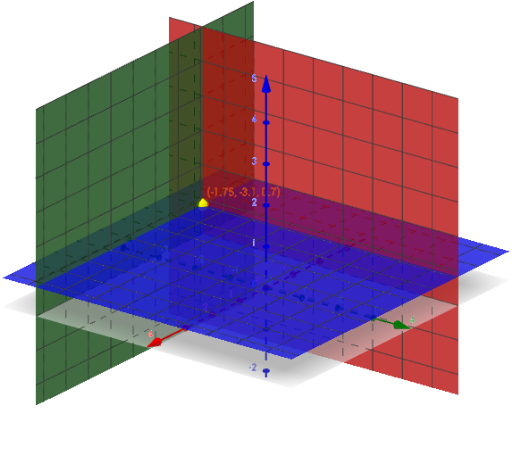
This GeoGebra example illustrates 3D coordinate systems by showing constant surfaces and a movable point in different coordinate frameworks. It demonstrates how the same point can be represented in Cartesian, cylindrical, and spherical coordinates, with surfaces of constant coordinate values (spheres, cones, planes) visualized interactively. Core mathematical concepts include coordinate transformations, parametric surfaces, and the geometry of constant-coordinate loci. The construction uses the SelectedIndex command to switch coordinate systems, Surface to render constant surfaces, Sphere and Cone to generate basic shapes, and sliders (r_0, θ_0, ϕ_0) to vary the point's coordinates. Suitable for high school or undergraduate courses in solid geometry, analytic geometry, or mathematical visualization, this applet helps learners grasp the meaning of coordinate systems and the relationship between different representations.
GeoGebra Commands & Parameters
SelectedIndex(System) → siSurface(x_0, u, v, u, -5, 5, v, -5, 5) → X_0Surface(u, y_0, v, u, -5, 5, v, -5, 5) → Y_0Surface(u, v, z_0, u, -5, 5, v, -5, 5) → Z_0Surface((r_0 * cos(u)), (r_0 * sin(u)), v, u, 0, (2 * π), v, -5, 5) → R_0CSurface((u * cos(θ_0)), (u * sin(θ_0)), v, u, 0, 5, v, -5, 5) → T_0Sphere((0, 0, 0), r_0) → aCone((0, 0, (5 * cot(ϕ_0))), (0, 0, 0), 5) → b, b_2, b_3
AI Drawing Prompt Reference
Create a 3D coordinate system showing a movable point represented in Cartesian, cylindrical, and spherical coordinates. Include three mutually perpendicular planes (for constant x, y, z), a cylinder (constant radial distance), a half-plane (constant azimuth), a sphere (constant radial distance), and a cone (constant polar angle). The point's position is controlled by three sliders corresponding to coordinates in the selected system. When switching coordinate systems, display the relevant constant-coordinate surfaces and highlight the point. Make all surfaces semi-transparent for visibility.
The prompt above was compiled from the original drawing commands and is for reference only.