
30-60-90 Special Right Triangle Interactive Discovery Lesson
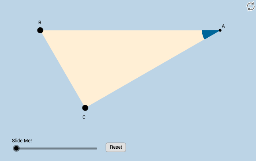
Loading the math board and drawing, please wait…
This example demonstrates the properties and construction of a 30-60-90 special right triangle through an interactive discovery lesson. It covers core mathematical concepts such as right triangles, median lines, piecewise functions, matrices, similar triangles, and hyperbolas. The construction utilizes GeoGebra commands like Ray, OrthogonalLine, Rotate, Angle, Intersect, Segment, Polygon, Circle, CircleSector, Dilate, Vector, Translate, and Midpoint. It is suitable for high school mathematics education, helping students understand and apply the geometric properties and algebraic aspects of special right triangles.
GeoGebra Commands & Parameters
Ray(B, C) → fOrthogonalLine(C, f) → gRotate(C, π / 3, B) → B'Angle(C, B, B') → αRay(B, B') → hIntersect(g, h) → ASegment(B, C) → iSegment(C, A) → jSegment(B, A) → kPolygon(B, C, A) → poly1, c_1, a, bCircle(A, (0.2 * i)) → eIntersect(e, k) → D,Intersect(e, j) → E,CircleSector(A, D, E) → dDilate(A, If[0 < l ≤ 1, 1 - l, 0], B) → C'Vector(A, C') → uTranslate(d, u) → d'Rotate(d', If[1 < l ≤ 2, (((l - 1) * 2) * π / 3), (2 * π / 3)], B) → d''Dilate(A, If[2 < l ≤ 3, 3 - l, 0], B) → C'_1Vector(A, C'_1) → vTranslate(d, v) → d'_1Rotate(d'_1, If[3 < l ≤ 4, (((-(l - 3)) * 7) * π / 6), (-7 * π / 6)], B) → pDilate(A, If[4 < l ≤ 5, 5 - l, 0], C) → C'_2Vector(A, C'_2) → wTranslate(d, w) → d'_2Dilate(A, If[6 < l ≤ 7, 7 - l, 0], C) → C'_3Vector(A, C'_3) → mTranslate(d, m) → d'_3Rotate(d'_2, If[5 < l ≤ 6, ((-(l - 5)) * π / 2), ((-π)) / 2], C) → qRotate(d'_3, If[7 < l ≤ 8, (((l - 7) * 4) * π / 3), (4 * π / 3)], C) → rDilate(A, If[8 < l ≤ 9, 9 - l, 0], C) → C'_4Vector(A, C'_4) → nTranslate(d, n) → d'_4Rotate(d'_4, If[9 < l ≤ 10, (((l - 9) * 7) * π / 6), (7 * π / 6)], C) → sMidpoint(B, A) → FDilate(B, If[10 < l ≤ 11, 11 - l, 0], C) → A'Segment(B, A') → tRotate(B, If[11 < l ≤ 12, ((l - 11) * π / 3), π / 3], B) → A'_1Rotate(A', If[11 < l ≤ 12, ((l - 11) * π / 3), π / 3], B) → A''Segment(A'_1, A'') → t'Dilate(B, If[12 < l ≤ 13, 13 - l, 0], F) → A'_2Vector(B, A'_2) → u_1Translate(B, u_1) → A'_3Translate(A', u_1) → A''_1Segment(A'_3, A''_1) → t'_1Rotate(A'_3, If[13 < l ≤ 14, ((l - 13) * π / 3), π / 3], F) → GRotate(A''_1, If[13 < l ≤ 14, ((l - 13) * π / 3), π / 3], F) → HSegment(G, H) → f_1
AI Drawing Prompt Reference
Draw a 30-60-90 special right triangle to demonstrate its properties and construction. Start with a line segment, create a perpendicular line and rotate to form the right angle. Draw a circle centered at the right angle vertex, intersecting the hypotenuse to find the midpoint, completing the triangle. Rotate and scale the triangle to show similarity and other geometric relationships, including medians, circles, and sectors. The final image should feature multiple rotated and scaled triangles, along with related circles and lines, highlighting the symmetry and proportional relationships of the special right triangle.
The prompt above was compiled from the original drawing commands and is for reference only.