
The Donkey Construction
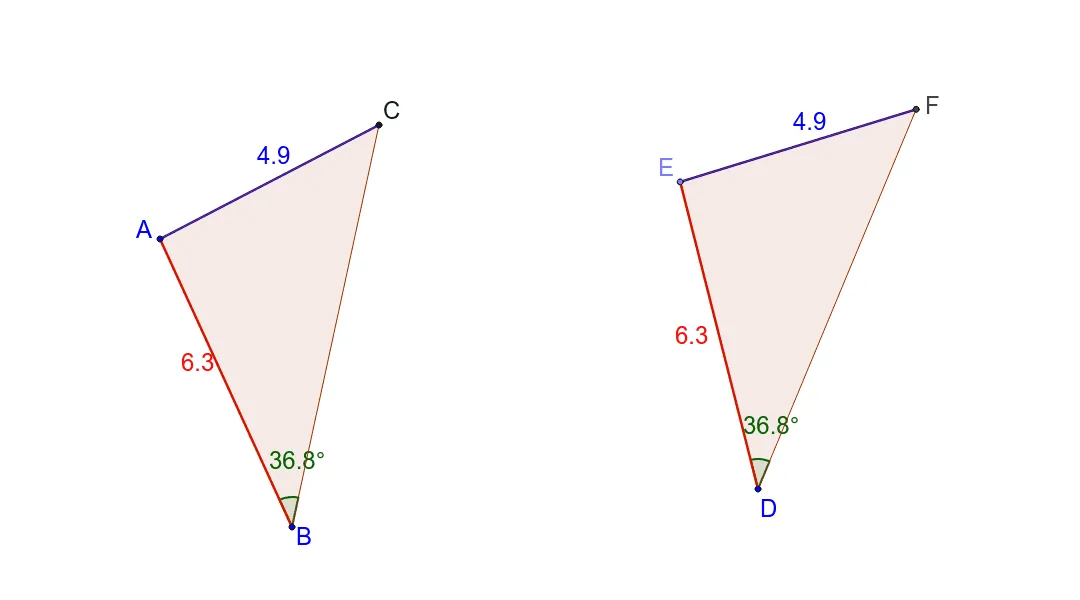
Loading the math board and drawing, please wait…
In collections
Triangle Congruence - Collection
This example demonstrates the geometric construction of a figure involving right triangles, circumcircles, and polygons. Key math concepts include right triangles, circumcircles, vectors, angles, and geometric transformations. Construction highlights the use of commands like Segment, Circle, Angle, Point, Rotate, Line, Intersect, and Polygon in GeoGebra. Suitable for high school mathematics, focusing on geometric drawing and spatial relationships.
GeoGebra Commands & Parameters
Segment(A, B) → aCircle(B, A) → cCircle(A, C) → dSegment(A, C) → bSegment(C, B) → eAngle(C, B, A) → αCircle(D, a) → fPoint(f) → ESegment(E, D) → gCircle(E, b) → hRotate(E, (-α), D) → E'Angle(E', D, E) → βLine(D, E') → iIntersect(h, i, 2) → FSegment(F, E) → jSegment(D, F) → kPolygon(B, A, C) → poly1, c_1, b_1, a_1Polygon(D, E, F) → poly2, f_1, d_1, e_1
AI Drawing Prompt Reference
Draw a figure with three right triangles, where two right triangles share one leg, and the third right triangle is connected to the hypotenuses of the first two triangles. Use commands for segments, circles, angles, rotations, and polygons to first draw the two right triangles, then construct the third triangle, and finally form two polygons.
The prompt above was compiled from the original drawing commands and is for reference only.