
Parallelogram and Vector Demonstration
Loading the math board and drawing, please wait…
In collections
Triangle Congruence - Collection
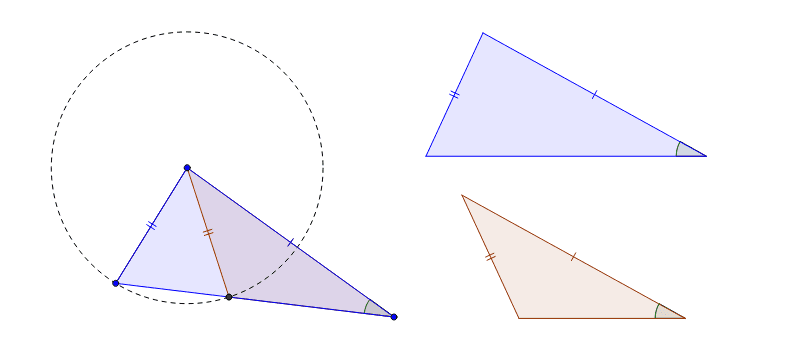
This example demonstrates how to construct a parallelogram using points and vectors, showcasing the properties of its diagonals. Core mathematical concepts include vectors, parallelograms, geometric construction, and coordinate geometry. Construction highlights involve commands/objects like Segment, Circle, Ray, Intersect, Polygon, Angle, Line, and Rotate from GeoGebra. Suitable for high school students to learn vector operations, geometric transformations, and properties of parallelograms, ideal for classroom instruction or self-study.
GeoGebra Commands & Parameters
Segment(A, B) → aSegment(C, A) → cCircle(A, B) → dRay(C, B) → bIntersect(d, b, 2) → DSegment(A, D) → eSegment(B, C) → fPolygon(A, D, C) → poly1, c_1, a_1, d_1Polygon(A, B, C) → poly2, c_2, a_2, b_1Angle(A, C, B) → αLine(E, g) → hRotate(h, (-α), E) → h'Circle(E, b_1) → kIntersect(k, h', 1) → FCircle(E, a_2) → pIntersect(p, h, 1) → GLine(H, g) → iRotate(i, (-α), H) → i'Circle(H, If[Defined[D], d_1]) → qIntersect(q, i', 1) → ICircle(H, a_1) → rIntersect(r, i, 1) → JPolygon(H, I, J) → poly3, j, h_1, i_1Polygon(E, F, G) → poly4, g_1, e_1, f_1Angle(F, E, G) → βAngle(I, H, J) → γ