
30-60-90 Special Right Triangle Discovery Learning Resource
Loading the math board and drawing, please wait…
In collections
Congruence (CO) Cluster
Congruence (Vol 2)
CCSS High School: Geometry (Congruence) Volume 2
CCSS High School: Geometry (Congruence) Volume 2
CCSS High School: Geometry (Congruence) Volume 2
Geometry (Congruence) Volume 2
CCSS High School: Geometry (Congruence) Volume 2
CCSS High School: Geometry (Congruence) Volume 2
CCSS High School: Geometry (Congruence) Volume 2
CCSS High School: Geometry (Congruence) Volume 2
CCSS High School: Geometry (Congruence) Volume 2
CCSS High School: Geometry (Congruence) Volume 2
CCSS High School: Geometry (Congruence) Volume 2
Gail LeBlancCCSS High School: Geometry (Congruence) Volume 2
CCSS High School: Geometry (Congruence) Volume 2
Triangle Theorems
Special Right Triangles
Special Right Triangles
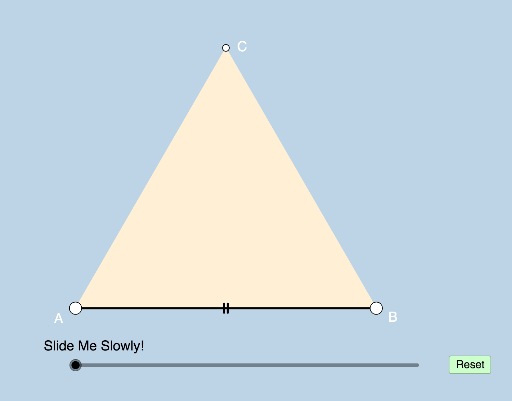
This example demonstrates the properties and construction of a 30-60-90 special right triangle. Key math concepts include right triangles, special angles, side length ratios, and similarity. Construction highlights involve using GeoGebra commands such as Polygon, Dilate, Segment, Circle, Intersect, CircleSector, Rotate, Vector, Translate, Midpoint, and Ray. Suitable for high school students to explore geometric properties and applications of special right triangles.
GeoGebra Commands & Parameters
Polygon(A, B, 3) → poly1, a, b, c, CDilate(A, If[0 < d ≤ 1, 1 - d, 0], B) → A'Segment(A, A') → eDilate(B, If[1 < d ≤ 2, 2 - d, 0], C) → B'Dilate(C, If[2 < d ≤ 3, 3 - d, 0], A) → C'Segment(A, B) → hSegment(A, C) → iSegment(B, C) → jCircle(A, (0.15 * h)) → kIntersect(k, i, 1) → DIntersect(k, h, 1) → ECircleSector(A, E, D) → pRotate(A, If[3.5 < d ≤ 4.5, ((d - 3.5) * π / 3), 1.0471975511965976], A) → A'_1Rotate(A', If[3.5 < d ≤ 4.5, ((d - 3.5) * π / 3), 1.0471975511965976], A) → A''Segment(A'_1, A'') → e'Rotate(A, If[4.5 < d ≤ 5.5, ((-(d - 4.5)) * π / 3), -1.0471975511965976], B) → A'_2Rotate(A', If[4.5 < d ≤ 5.5, ((-(d - 4.5)) * π / 3), -1.0471975511965976], B) → A''_1Segment(A'_2, A''_1) → e'_1Dilate(A, If[6 < d ≤ 7, 7 - d, 0], B) → A'_3Vector(A, A'_3) → uTranslate(p, u) → p'Rotate(p', If[7 < d ≤ 8, (((d - 7) * 2) * π / 3), 2.0943951023931953], B) → p''Circle(B, (0.15 * h)) → rIntersect(r, j, 1) → FIntersect(r, h, 1) → KDilate(B, If[8 < d ≤ 9, 9 - d, 0], C) → B'_1Vector(B, B'_1) → vTranslate(p'', v) → p'''Rotate(p''', If[9 < d ≤ 10, (((d - 9) * 2) * π / 3), 2.0943951023931953], C) → tCircle(C, (0.15 * h)) → c_1Intersect(c_1, i) → M,Intersect(c_1, j) → N,Midpoint(h) → ODilate(C, If[10 < d ≤ 11, 11 - d, 0], O) → C'_1Segment(C, C'_1) → lCircle(O, (0.15 * h)) → d_1Segment(C, O) → mIntersect(d_1, m, 1) → PIntersect(d_1, h) → Q, RPolygon(A, O, C) → poly2, c_2, a_1, oIntersect(c_1, m) → S,CircleSector(C, S, N) → e_1CircleSector(O, R, P) → f_1Segment(O, B) → nRotate(e_1, If[13 < d ≤ 14, ((-(d - 13)) * π / 6), -0.5236], C) → h_1Rotate(O, If[13.25 < d ≤ 14.25, ((-(d - 13.25)) * π), -3.141592653589793], O) → O'Rotate(B, If[14 < d ≤ 15, ((d - 14) * π), 3.14159], O) → B'_2Segment(O', B'_2) → n'Segment(O, B) → b_1Dilate(C, If[15 < d ≤ 16, 16 - d, 0], A) → C'_2Vector(C, C'_2) → wTranslate(h_1, w) → q_1Dilate(C, If[17 < d ≤ 18, 18 - d, 0], A) → C'_3Vector(C, C'_3) → u_1Translate(h_1, u_1) → s_1Rotate(O', If[19 < d ≤ 20, ((d - 19) * π / 3), 1.0472], A) → O''Rotate(B'_2, If[18.25 < d ≤ 19.25, ((d - 18.25) * π / 3), 1.0471975511965976], A) → USegment(O'', U) → n''Rotate(O'', If[19.25 < d ≤ 20.25, ((d - 19.25) * π), π], O'') → O'''Rotate(U, If[20 < d ≤ 21, ((d - 20) * π), π], O'') → U'Segment(O''', U') → n'''Rotate(f_1, If[12 < d ≤ 13, ((d - 12) * π / 2), 1.5708], O) → g_1Rotate(q_1, If[16 < d ≤ 17, (((-(d - 16)) * 4) * π / 3), -4.18879], A) → r_1Rotate(s_1, If[18 < d ≤ 19, (((-(d - 18)) * 7) * π / 6), -3.66519], A) → t_1Rotate(E, π / 6, A) → E'Ray(A, E') → fCircle(A, (0.2 * h)) → qIntersect(q, f, 1) → GSegment(A, G) → g
AI Drawing Prompt Reference
Draw a 30-60-90 special right triangle to demonstrate its side length ratios and angle relationships. Start by constructing an equilateral triangle, then shorten and scale one side to form a right triangle. Next, draw a circle centered at the right angle vertex, intersecting the hypotenuse and one leg to locate the 30° and 60° angles. Use rotations and dilations to create additional shapes like circular sectors and similar triangles, resulting in a comprehensive geometric illustration with labeled elements.
The prompt above was compiled from the original drawing commands and is for reference only.