
3 - Octahedron: Constructing a Regular Octahedron in 3D
Loading the math board and drawing, please wait…
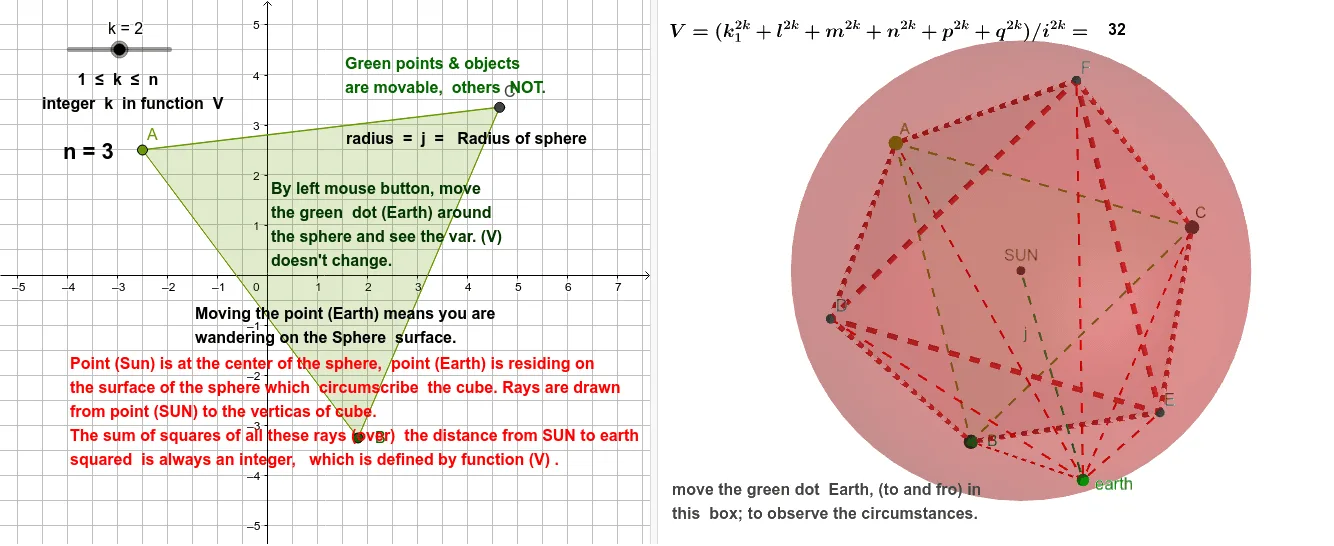
① This example demonstrates how to construct a complete regular octahedron in GeoGebra's 3D environment, starting from vertices, edges, and faces, and exploring its symmetry and internal structure. ② Core mathematical concepts include the definition of a regular octahedron (eight equilateral triangular faces, six vertices, twelve edges), symmetry of polyhedra, barycenter, and geometric transformations in 3D space. ③ Construction highlights: using the Polygon command to create base polygons, the Octahedron command to directly generate the solid, Barycenter to compute the centroid, Segment to connect edges, Sphere to construct circumscribed spheres, and PointIn to mark interior points; objects include vertices A, B, C, D, E, F, triangular faces (faceACF, faceADF, etc.), edges (edgeAF, edgeCF, etc.), and auxiliary spheres SUN and earth, illustrating a step-by-step build from basic elements to a complex solid model. ④ Suitable for high school solid geometry, introductory college geometry, and math enthusiasts exploring polyhedral properties; also useful for demonstrating GeoGebra's 3D construction capabilities.
GeoGebra Commands & Parameters
Polygon(A, B, 3) → poly1, f, g, h, COctahedron(poly1, true) → a, D, faceDEF, edgeAF, edgeCF, edgeAD, edgeDF, edgeBD, edgeBE, edgeDE, edgeCE, edgeEF, E, F, faceACF, faceADF, faceABD, faceBDE, faceBCE, faceCEFBarycenter({A, B, C, D, E, F}, {1, 1, 1, 1, 1, 1}) → SUNSegment(SUN, E) → iSphere(SUN, i) → bPointIn(b) → earthSegment(A, earth) → qSegment(C, earth) → pSegment(B, earth) → nSegment(F, earth) → mSegment(D, earth) → lSegment(E, earth) → k_1Segment(SUN, earth) → j
AI Drawing Prompt Reference
Construct a regular octahedron in 3D space, starting with vertices and edges, highlighting its eight equilateral triangular faces, six vertices, and twelve edges. Begin by creating base triangles with the polygon command, then generate the octahedron solid directly. Compute the centroid, connect edges to form the complete model, and draw circumscribed spheres. Mark the center point inside the sphere and connect it to each vertex, illustrating the symmetry and internal structure of the octahedron with auxiliary spheres.
The prompt above was compiled from the original drawing commands and is for reference only.