
Section of Triangular Pyramids
Loading the math board and drawing, please wait…
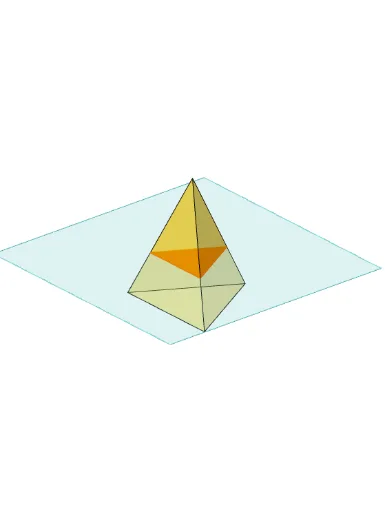
①This example demonstrates how to construct a triangular pyramid (tetrahedron) in GeoGebra and generate a cross-section by intersecting a plane with the pyramid, visually revealing the shape and position of the section in solid geometry. ②Core mathematical concepts include pyramids, cross-sections, intersection of a plane with a polyhedron, and spatial transformations such as translation and rotation; auxiliary tools like arithmetic mean, trigonometric functions, and matrices are also involved in the construction. ③Construction highlights: from the summary, commands such as Polygon (creating base polygon), PointIn (point on face), Translate and Rotate (spatial movement and rotation), Pyramid (generating the pyramid), Plane (defining the cutting plane), IntersectPath (computing the intersection path), and OrthogonalLine (perpendicular lines) are used; objects include faces (face1-3), edges (edge1-3), and text labels (text1-9) for annotations. ④Suitable for high school or early college students learning solid geometry, allowing dynamic manipulation to observe how the section changes, enhancing spatial visualization and geometric reasoning; also useful for teacher demonstrations or student self-exploration.
GeoGebra Commands & Parameters
Polygon(B + (-2, -2), B + (2, -2), B + (2, 2), B + (-2, 2)) → poly3, e, f, g, iPointIn(poly3) → CTranslate((0, 0, 0), Vector[B, C]) → APolygon(A + (-4, -4), A + (4, -4), A + (4, 4), A + (-4, 4)) → poly1, a, b, c, dRotate(Rotate[Translate[poly1, Vector[A, A + (0, 0, h)]], (90° * s), A + (0, 0, h), yAxis], (90° * t), A, zAxis) → poly2Pyramid(Polygon[(-2, 0, 0), Rotate[(-2, 0, 0), 120°, zAxis], Rotate[(-2, 0, 0), -120°, zAxis]], (0, 0, 4)) → m, face1, face2, face3, edge1, edge2, edge3Rotate(D, 120°, (0, 0, 0)) → EPolygon(D, E, 3, xOyPlane) → poly4, j, k, l, FPointIn(poly2) → GPointIn(poly2) → HPointIn(poly2) → IPlane(G, I, H) → nIntersectPath(n, m) → poly6, poly5, r, a_1, b_1, c_1, K, L_1, O, P, J, L, p, qRotate(m, 0, zAxis) → m'Rotate(m, 0, zAxis) → m'_1OrthogonalLine(A, n) → d_1
AI Drawing Prompt Reference
Draw a tetrahedron with a square base and a vertex above the center. First, draw the base, then move the vertex upward. Define a cutting plane and intersect it with the tetrahedron to get a cross-section. The cross-section will be a triangle or quadrilateral depending on the cut position. Finally, label the base, vertex, and cross-section to help understand spatial relationships.
The prompt above was compiled from the original drawing commands and is for reference only.