
3.4.5 Museo de Onda: Azulejo 5 - Geometric Construction and Function Graphing
Loading the math board and drawing, please wait…
In collections
geometriadinamica.es
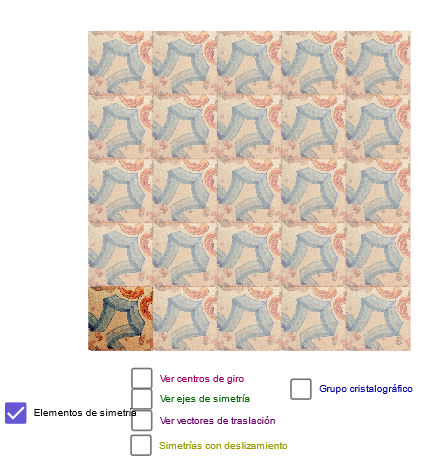
This example demonstrates constructing function graphs through geometric methods. Key mathematical concepts include triangles, function graphing, and geometric transformations. Construction involves GeoGebra commands like Line, Point, OrthogonalLine, etc. Suitable for high school students or college freshmen learning geometry and function applications.
GeoGebra Commands & Parameters
Line(A, B) → bLine(G, b) → ePoint(e) → JOrthogonalLine(J, e) → hOrthogonalLine(G, e) → fPoint(f) → HOrthogonalLine(H, f) → gIntersect(g, h) → EMidpoint(E, H) → IMidpoint(I, E) → B_1Midpoint(G, J) → DMidpoint(J, E) → FMidpoint(H, G) → KMidpoint(D, I) → LMidpoint(K, L) → MMidpoint(L, F) → NMidpoint(F, J) → OMidpoint(J, D) → PMidpoint(G, D) → QMidpoint(K, G) → RMidpoint(Q, M) → SMidpoint(L, D) → TMidpoint(P, N) → UMidpoint(F, E) → VMidpoint(K, H) → WMidpoint(W, V) → ZMidpoint(H, I) → A_1Midpoint(N, B_1) → C_1Midpoint(Z, W) → D_1Mirror(B_1, h) → A_2Point(b) → A1Min(90, ((a - 1) * 90)) → r1Rotate(U, ((-r1))°, T) → U'_3Rotate(T, ((-r1))°, T) → T'_8Rotate(T, ((-r1))°, T'_8) → T'_9Rotate(L, ((-r1))°, T) → L'_2Midpoint(C_1, E) → K_{20}Min(180, ((a - 1) * 180)) → r2Min(270, ((a - 1) * 270)) → r3Rotate(T, r1°, T) → T'_4Rotate(T, r2°, T) → T'_5Rotate(T, r3°, T) → T'_6Rotate(L, r1°, T) → L'_1Rotate(L, r2°, T) → L'_3Rotate(L, r3°, T) → L'_4Min(180, ((a - 5.5) * 180)) → r4Vector(N, U) → zVector(N, F) → u_1Translate(pic1, z) → pic1'Translate(pic1', z) → pic1''Translate(pic1'', z) → pic1'''Translate(pic1''', z) → pic2Translate(pic2, u_1) → pic2'Translate(pic2', u_1) → pic2''Translate(pic2'', u_1) → pic2'''Translate(pic2''', u_1) → pic3Translate(pic1, u_1) → pic1'_1Translate(pic1'_1, u_1) → pic4Translate(pic4, u_1) → pic4'Translate(pic4', u_1) → pic4''Translate(pic1', u_1) → pic1''_1Translate(pic1''_1, z) → pic5Translate(pic5, z) → pic5'Translate(pic5', u_1) → pic5''Translate(pic5'', u_1) → pic5'''Translate(pic5''', u_1) → pic6Translate(pic5, u_1) → pic5'_1Translate(pic1''_1, u_1) → pic7Translate(pic7, u_1) → pic7'Translate(pic7', u_1) → pic7''Translate(pic7', z) → pic7''_1Translate(pic7'', z) → pic7'''Line(D_1, J) → dLine(P, M) → iLine(S, D) → jLine(Z, O) → kLine(C_1, F) → lOrthogonalLine(D, j) → mIntersect(i, m) → CIntersect(k, m) → E_1Midpoint(D, C) → F_1Midpoint(C, U) → G_1Midpoint(U, E_1) → H_1Midpoint(E_1, F) → I_1OrthogonalLine(F_1, m) → nOrthogonalLine(G_1, m) → pOrthogonalLine(H_1, m) → qOrthogonalLine(I_1, m) → r
AI Drawing Prompt Reference
Draw a geometric construction based on a base line b and a given point G in the plane. Start by using b to define a point J on the line, then construct two perpendicular lines: one through J perpendicular to b, and another through G perpendicular to the corresponding line e. Intersect these auxiliary perpendicular lines to obtain a key intersection point E. From E and other already constructed points (including H, J, and G), repeatedly take midpoints to build a multi-stage internal subdivision, producing a central point U and additional midpoint-defined points. Then perform chained rotations around the pivot T: rotate U about T by an angle derived from a parameter a, rotate T about itself by the first angle, rotate T again using the rotated position, and rotate another key point L about T by three related angles. The resulting figure should show a symmetric, tiling-like geometric arrangement, with direction cues consistent with vectors from N toward U and F.
The prompt above was compiled from the original drawing commands and is for reference only.