
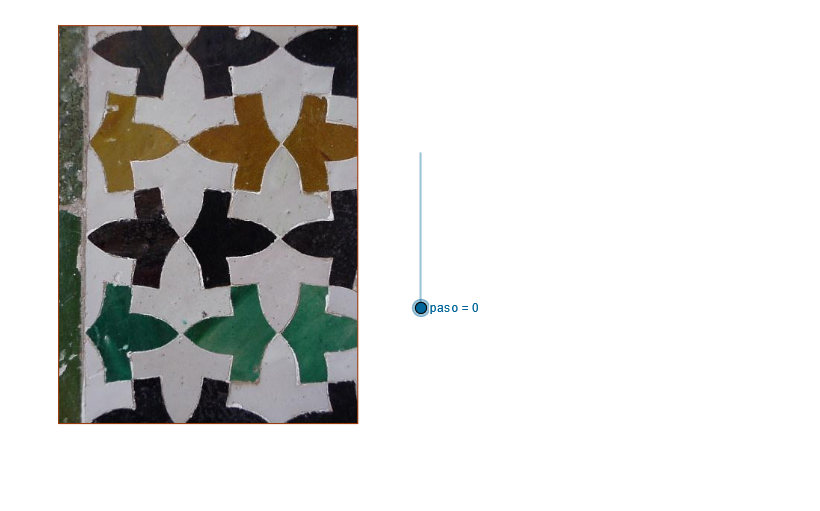
21. Mosaico. La Alhambra
Loading the math board and drawing, please wait…
In collections
geometriadinamica.es
This example demonstrates the geometric pattern construction of the Alhambra, involving triangles, circles, and polygons. Key mathematical concepts include geometric construction, transformations, and coordinate geometry. Construction involves GeoGebra commands like If, Line, OrthogonalLine, etc. Suitable for middle or high school mathematics courses to learn geometric transformations and graph analysis.
GeoGebra Commands & Parameters
If(paso > 0 ∧ paso < 7, 1, 0) → t_1If(paso > 1 ∧ paso < 7, 1, 0) → t_2If(paso > 2 ∧ paso < 7, 1, 0) → t_3If(paso > 3 ∧ paso < 7, 1, 0) → t_4If(paso > 4 ∧ paso < 7, 1, 0) → t_5If(paso > 5 ∧ paso < 7, 1, 0) → t_6Line(H1, H2) → aLine(A, a) → bOrthogonalLine(A, a) → cPoint(b) → BDilate(B, pr, A) → DilCircle(A, Dil) → dIntersect(d, c) → D5, COrthogonalLine(C, c) → eOrthogonalLine(B, b) → fIntersect(f, e) → DPolygon(A, B, D, C) → P, a_1, b_1, d_1, c_1OrthogonalLine(B_1, a_1) → gLine(E, g) → hPoint(h) → FPoint(g) → HPoint(g) → IVector(F, H) → uVector(F, I) → vLine(B_2, a_1) → iLine(M, i) → jLine(J, i) → kOrthogonalLine(K, i) → lOrthogonalLine(L, i) → mIntersect(l, k) → R1Intersect(m, k) → R2Intersect(m, j) → R4Intersect(l, j) → R3Intersect(l, i) → R5Intersect(m, i) → R6Line(G, i) → nLine(N, i) → pLine(O, i) → qPoint(q) → S3Point(q) → S2Point(q) → S1Point(p) → S6Point(p) → S5Point(p) → S4Point(n) → S9Point(n) → S8Point(n) → S7Point(i) → QPoint(j) → RPoint(k) → SPoint(m) → TLine(B_3, c_1) → rLine(T, r) → sOrthogonalLine(Q, r) → tOrthogonalLine(R, r) → e_1OrthogonalLine(S, r) → f_1OrthogonalLine(B_4, a_1) → g_1OrthogonalLine(S7, g_1) → h_1OrthogonalLine(S4, g_1) → i_1OrthogonalLine(S1, g_1) → j_1Line(S8, g_1) → k_1Line(S9, g_1) → l_1Rotate(g_1, 45°, B_4) → m_1Intersect(k_1, e_1) → UIntersect(k_1, f_1) → VLine(U, m_1) → n_1Line(V, m_1) → p_1Intersect(k_1, t) → WLine(W, m_1) → q_1OrthogonalLine(W, m_1) → r_1OrthogonalLine(U, m_1) → s_1OrthogonalLine(V, m_1) → a_2Intersect(r, j_1) → YOrthogonalLine(Y, m_1) → b_2OrthogonalLine(B_5, b_1) → c_2Point(c_2) → ZIntersect(c_2, s) → C_1Point(k_1) → D_1Point(j_1) → E_1Point(j_1) → F_1Point(l_1) → G_1Polygon(C_1, D_1, S2, E_1, R2, F_1, S3, G_1) → P_1, c_3, d_2, s2, e_2, r2, f_2, s3, g_2Point(c_2) → K_1OrthogonalLine(B_6, c_1) → h_2Point(h_2) → M_1Point(g_1) → H_1Point(j_1) → J_1Point(j_1) → L_1Point(d_2) → N_1Point(k_1) → O_1Intersect(h_2, s) → R_1Point(i_1) → S_1Point(k_1) → T_1Point(l_1) → U_1Point(i_1) → V_1Polygon(R_1, S_1, S5, T_1, R4, U_1, S6, V_1) → W_1, r_2, s_2, s5, t_7, r4, u_1, s6, v_1Point(h_2) → Y_1Point(r) → Z_1Polygon(Y_1, H_1, S1, J_1, Z_1, L_1, N_1, O_1) → P_2, y_1, h_4, s1_1, j_3, z_1, l_3, n_3, o_2Point(g_1) → I_1Point(i_1) → Q_1Point(i_1) → C_2Point(s5) → D_2Point(k_1) → E_2Polygon(Y_1, I_1, S4, Q_1, R3, C_2, D_2, E_2) → Q_2, y_2, i_2, s4, q_2, r3, c_4, d_3, e_3Point(h_2) → F_2Polygon(F_2, I_1, S4, Q_1, R3, C_2, D_2, E_2) → R_2, f_3, i_3, s4_1, q_3, r3_1, c_5, d_4, e_4Polygon(F_2, H_1, S1, J_1, Z_1, L_1, N_1, O_1) → S_2, f_4, h_3, s1, j_2, z_2, l_2, n_2, o_1
AI Drawing Prompt Reference
Draw a geometric pattern composed of triangles, circles, and polygons. Start by constructing line a through points A and H2, then construct line b through point A and line a, followed by the perpendicular line c to line b and finding point B on line c. Perform a similarity transformation on point B with respect to point A to get point Dil, then construct circle d with radius ADil. Find the intersection points D5 and C of circle d and line c. Construct the perpendicular lines e to point C and f to point B, and find their intersection point D. Use points A, B, D, and C to construct polygon P. Continue by constructing the perpendiculars of polygon P's sides to find new points F, H, and I, and use these points to construct new lines and polygons, ultimately forming a complex geometric pattern.
The prompt above was compiled from the original drawing commands and is for reference only.