
2-Digit Subtraction
Loading the math board and drawing, please wait…
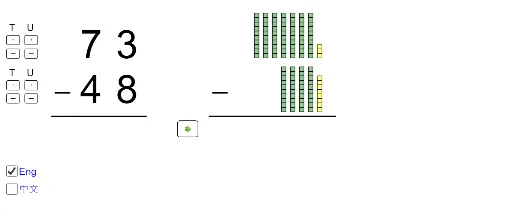
This example demonstrates the calculation and visualization process of 2-digit subtraction. It involves core mathematical concepts such as subtraction operations and numerical comparison. Key GeoGebra commands and objects used in the construction include Div (division), Segment (line segment), If (conditional statements), Sequence (sequences), Corner (corner points), Mod (modulus operation), and Textfield (text fields). It is suitable for middle school students or beginners in mathematics to learn subtraction and basic geometric representations.
GeoGebra Commands & Parameters
Div(diff, 10) → atensSegment(A, B) → fIf(nunits > munits, mtens - 1, mtens) → ntensmaxIf(ntens ≟ mtens, munits - 1, 9) → nunitsmaxSequence(Polygon[{C' + (0, i), C' + (1, i), C' + (1, i + 1), C' + (0, i + 1)}], i, 0, munits - 1) → L_1Sequence(Polygon[{D + (0, i), D + (1, i), D + (1, i + 1), D + (0, i + 1)}], i, 0, nunits - 1) → L_3Sequence(Sequence[Polygon[{D + (((-(1 + d)) * j), i), D + (1 - ((1 + d) * j), i), D + (1 - ((1 + d) * j), i + 1), D + (((-(1 + d)) * j), i + 1)}], i, 0, 9], j, 1, ntens) → L_4If(nunits > munits, C' + (-2, 10), C' + (0, munits)) → C0If((t2 * nunits) ≤ munits, (0, 0), (-2, 10 - munits)) → C1Segment(E, F) → gSequence(Sequence[Polygon[{C' + (((-(1 + d)) * j), i), C' + (1 - ((1 + d) * j), i), C' + (1 - ((1 + d) * j), i + 1), C' + (((-(1 + d)) * j), i + 1)}], i, 0, 9], j, 2, mtens) → L_2Sequence(Polygon[{C' + ((-(1 + d)), i), C' + (1 - (1 + d), i), C' + (1 - (1 + d), i + 1), C' + ((-(1 + d)), i + 1)}], i, 0, 9) → L_7Sequence(Segment[D0 + (-0.2, (-j) - 0.2), D0 + (1.2, (-(j - 1)) + 0.2)], j, 1, (t2 * nunits)) → L_5Corner(text1, 1) → GCorner(text1, 3) → HSegment(G + (0, (y(H) - y(G)) / 4), H + (0, (y(G) - y(H)) / 6)) → hSegment(I - (0.02, 0.2), I + (1.02, 10.2)) → iSegment(J - (0.02, 0.2), J + (1.02, 10.2)) → jMod(diff, 10) → aunitsSequence(Polygon[{C2 + (0, i), C2 + (1, i), C2 + (1, i + 1), C2 + (0, i + 1)}], i, 0, If[nunits > munits, 10 - nunits - 1, munits - nunits - 1]) → L_{10}Sequence(Sequence[Polygon[{C2' + (((-(1 + d)) * j), i), C2' + (1 - ((1 + d) * j), i), C2' + (1 - ((1 + d) * j), i + 1), C2' + (((-(1 + d)) * j), i + 1)}], i, 0, 9], j, 1, atens) → L_{12}Textfield(ansunits) → InputBox1Textfield(anstens) → InputBox2Corner(text2, 1) → LCorner(text2, 3) → MSegment(L + (0, (y(M) - y(L)) / 4), M + (0, (y(L) - y(M)) / 6)) → kIf(ansunits ≟ "", true, false) → notinput1If(ansunits ≟ aunits', true, false) → correct1If(anstens ≟ "", true, false) → notinput2If(anstens ≟ atens', true, false) → correct2If(nunits > munits, 1, 0) → s1If(nunits > 0, 1, 0) → s2If(aunits > 0, 1, 0) → s3If(ntens > 0, 1, 0) → s4If(atens > 0, 1, 0) → s5If(t1 + t2 + t3 + t4 + t5 ≟ s1 + s2 + s3 + s4 + s5, true, false) → finishedSequence(Translate[j, Vector[(k * Vector[(-2, 0)])]], k, 0, (t4 * ntens) - 1) → L_9Sequence(Translate[i, Vector[(j * Vector[(-2, 0)])]], j, 0, (t4 * ntens) - 1) → L_8Sequence(Segment[C0 + (-0.2, (-j) - 0.2), C0 + (1.2, (-(j - 1)) + 0.2)], j, 1, (t2 * nunits)) → L_6Sequence(Polygon[{C3' + (0, i), C3' + (1, i), C3' + (1, i + 1), C3' + (0, i + 1)}], i, 0, munits - 1) → L_{14}
AI Drawing Prompt Reference
Draw an educational diagram for two-digit subtraction. Show the minuend and subtrahend as columns of unit squares, with tens on the left and ones on the right. The minuend is above the subtrahend. Below them, draw two horizontal lines for writing the answer. If the ones digit of the minuend is smaller, indicate borrowing by drawing diagonal slashes across the tens column and adding ten extra squares to the ones column of the minuend. Use distinct shading for borrowed or remaining squares. Include two input boxes for the tens and ones answers, with visual feedback for correctness. Keep the layout neat and clear for classroom use.
The prompt above was compiled from the original drawing commands and is for reference only.