
斜截面圆柱展开图绘制
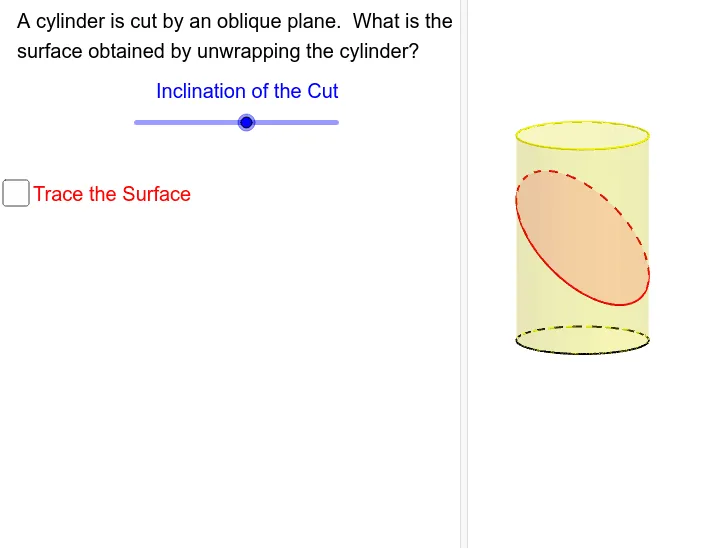
几何画板及绘图内容加载中,请稍等……
本范例演示了如何通过追踪法展开被斜截面切割的圆柱体。涉及的核心数学概念包括圆柱、中线、加法、菱形和函数图像。作图要点使用了GeoGebra的Intersect(相交)、Point(点)、Circle(圆)、Cylinder(圆柱)、Translate(平移)、Plane(平面)、IntersectPath(路径相交)、Line(线)、Segment(线段)、CircleArc(圆弧)等命令和对象。适合高中立体几何教学和几何作图练习。
GeoGebra 命令及参数
Intersect(xAxis, yAxis) → APoint(xAxis) → BCircle(A, B) → cPoint(zAxis) → CCylinder(A, C, 1) → a, d, e, bTranslate(xOyPlane, Vector[(0, 0, 1.719232508579406)]) → xOyPlane'Plane((0, 1, z(C) / 2), (0, -1, z(C) / 2), (1, 0, (z(C) / 2 * (1 - t)))) → fIntersectPath(f, a) → gLine(F, zAxis) → f_1Intersect(f_1, g) → D,Segment(D, F) → hSegment(E, (x(E), 0)) → iCircleArc((0, 0), F, (1, 0)) → kSegment((-3.141592653589793, 0), G) → l