
雨伞架
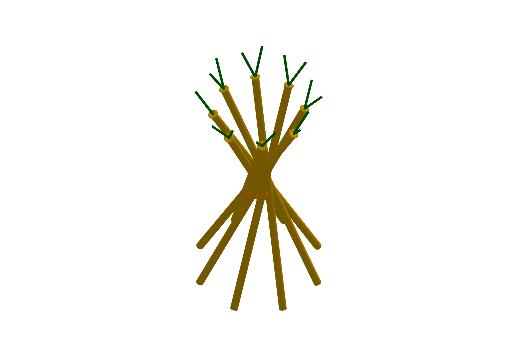
几何画板及绘图内容加载中,请稍等……
这个范例演示了一个雨伞架的几何构造。它涉及圆、圆柱、立体几何等核心数学概念。通过使用GeoGebra命令如Intersect、Circle、Rotate等,可以构造出雨伞架的各个部分。适合高中或大学的立体几何学习。
GeoGebra 命令及参数
Intersect(yAxis, zAxis) → A_{2}Circle(A_{2}, 0.3, zAxis) → cIntersect(xAxis, c, 1) → B_{2}Line(B_{2}, zAxis) → gRotate(g, 25°, f_{3}) → g'Intersect(g', h) → C_{2}Intersect(g', p) → DCylinder(C_{2}, D, 0.1) → a, d_{3}, e_{3}, bIntersect(yAxis, f_{3}) → EIntersect(f_{3}, c, 2) → FLine(F, zAxis) → iRotate(i, -25°, yAxis) → i'Intersect(i', h) → GIntersect(i', p) → HCylinder(G, H, 0.1) → j, k, q, lIntersect(yAxis, c, 1) → ILine(I, zAxis) → mRotate(m, -25°, r) → m'Intersect(m', h) → JIntersect(m', p) → KCylinder(K, J, 0.1) → n, s, t, oIntersect(r, c) → L, MLine(L, zAxis) → f_1Rotate(f_1, 25°, xAxis) → g_1Intersect(g_1, h) → NIntersect(g_1, p) → OCylinder(N, O, 0.1) → u, c_1, d_1, vIntersect(xAxis, c, 2) → PLine(P, zAxis) → h_1Rotate(h_1, -25°, f_{3}) → i_1Intersect(i_1, h) → QIntersect(i_1, p) → RCylinder(R, Q, 0.1) → w, e_1, k_1, a_1Intersect(f_{3}, c, 1) → SLine(S, zAxis) → j_1Rotate(j_1, 25°, yAxis) → l_1Intersect(l_1, h) → TIntersect(l_1, p) → UCylinder(T, U, 0.1) → b_1, p_1, q_1, m_1Intersect(yAxis, c, 2) → VLine(V, zAxis) → n_1Rotate(n_1, 25°, r) → r_1Intersect(r_1, h) → WIntersect(r_1, p) → ZCylinder(W, Z, 0.1) → o_1, s_1, t_1, u_1Line(M, zAxis) → f_2Rotate(f_2, -25°, xAxis) → g_2Intersect(g_2, h) → A_1Intersect(g_2, p) → B_1Cylinder(A_1, B_1, 0.1) → v_1, c_2, d_2, w_1Point(yAxis) → E_1Circle(E, E_1) → h_2Point(l_1) → C_1Cone(C_1, T, 0.3) → a_2, e_2, b_2Point(e_2) → CSegment(T, C) → fRotate(C, 180°, l_1) → ARotate(A, 120°, l_1) → BSegment(T, A) → dSegment(T, B) → eRotate(l1, 45°, zAxis) → l1'Rotate(l1, 90°, zAxis) → l1'_{1}Rotate(l1, 135°, zAxis) → l1'_{2}Rotate(l1, 180°, zAxis) → l1'_{3}Rotate(l1, 225°, zAxis) → l1'_{4}Rotate(l1, 270°, zAxis) → l1'_{5}Rotate(l1, 315°, zAxis) → l1'_{6}Rotate(l1, 360°, zAxis) → l1'_{7}
AI 绘图提示语参考
请绘制一个伞架的立体图形。图形由多个圆柱体组成,这些圆柱体通过旋转和相交的方式连接在一起。构造顺序是先确定几个关键点,然后利用这些点生成圆柱体,最后将它们组合成一个整体。图形应呈现为一系列相互关联的圆柱体,类似于伞架的结构。
以上提示语为根据原始绘图命令整理而来,仅供参考。