
刚性变换与相似变换组合工具
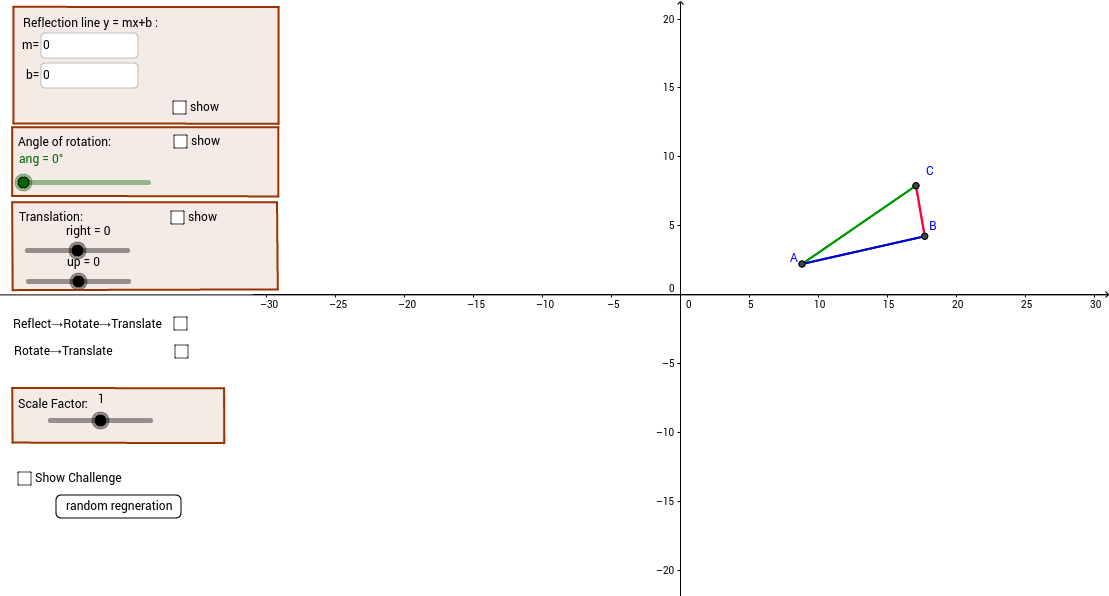
几何画板及绘图内容加载中,请稍等……
所属专题
Congruence (CO) Cluster
Congruence (Vol 1)
Congruence (Vol 1) Over 80 Resources
CCSS High School: Geometry (Congruence) Volume 1 S N ATTAR
Geometry (Congruence) Volume 1
CCSS High School: Geometry (Congruence) Volume 1
CCSS High School: Geometry (Congruence) Volume 1
CCSS High School: Geometry (Congruence) Volume 1
CCSS High School: Geometry (Congruence) Volume 1
CCSS High School: Geometry (Congruence) Volume 1
CCSS High School: Geometry (Congruence) Volume 1
CCSS High School: Geometry (Congruence) Volume 1
CCSS High School: Geometry (Congruence) Volume 1
CCSS High School: Geometry (Congruence) Volume 1
CCSS High School: Geometry (Congruence) Volume 1
CCSS High School: Geometry (Congruence) Volume 1
CCSS High School: Geometry (Congruence) Volume 1
该范例演示了刚性变换与相似变换的组合。刚性变换包括平移、旋转和反射,相似变换则包括这些变换加上比例变换。通过调整参数,可以观察变换组合的效果。涉及的核心数学概念包括几何变换、相似变换和比例变换。使用了TextField、Segment、Element、Polygon等GeoGebra命令进行构造。适合初中及以上学生或教师使用。
GeoGebra 命令及参数
Textfield(m) → inputBox1Textfield(b) → inputBox2Segment(A, B) → aSegment(B, C) → cSegment(C, A) → dElement(A5, 1, 1) → B5Element(A5, 1, 2) → C5Element(A6, 1, 1) → B6Element(A7, 1, 1) → B7Element(A6, 1, 2) → C6Element(A7, 1, 2) → C7Element(A9, 1, 1) → B9Element(A9, 1, 2) → C9Element(A10, 1, 1) → B10Element(A11, 1, 1) → B11Element(A10, 1, 2) → C10Element(A11, 1, 2) → C11Element(A13, 1, 1) → B13Element(A14, 1, 1) → B14Element(A15, 1, 1) → B15Element(A18, 1, 1) → B18Element(A18, 1, 2) → C18Element(A19, 1, 1) → B19Element(A19, 1, 2) → C19Element(A20, 1, 1) → B20Element(A20, 1, 2) → C20Segment(D15, D14) → gSegment(D13, D14) → hSegment(D15, D13) → iSegment(D20, D19) → jSegment(D19, D18) → kSegment(D18, D20) → lSegment(D11, D9) → nSegment(D9, D10) → pSegment(D10, D11) → qSegment(D6, D7) → rSegment(D5, D7) → sSegment(D6, D5) → tPolygon(D, F, G, E) → poly1, d_1, f_1, g_1, e_1Polygon(H, I, J, K) → poly2, h_1, i_1, j_1, k_1Polygon(L, M, N, O) → poly3, l_1, m_1, n_1, o_1Element(A23, 1, 1) → B23Element(A23, 1, 2) → C23Element(A24, 1, 1) → B24Element(A24, 1, 2) → C24Element(A25, 1, 1) → B25Element(A25, 1, 2) → C25Segment(D23, D25) → a_1Segment(D24, D25) → b_1Segment(D24, D23) → c_1Segment(A28, A30) → q_1Segment(A30, A29) → r_1Segment(A29, A28) → s_1Polygon(P, Q, R, S) → poly4, p_2, q_2, r_2, s_2Shuffle({0, 0, 0, 0, 0, 0, 3 + 0 * v_1}) → A55Element(A55, 1) → A56Shuffle({1, 1, 1, 1, 0.7, 1.2, 0.4, 1.5, 0.3, 1, 1, 1, 1.1, 1.3, 1 + 0 * v_1}) → A59Element(A59, 1) → A60Shuffle({0, 0, 0, 0, 0, 0, 0, 1, 2, -1, -2, 1, 1, 4, 0, 0, 0, 0 * v_1}) → A51Segment(E64, E63) → t_1Segment(E62, E63) → a_2Segment(E62, E64) → b_2Textfield(m) → inputBox3
AI 绘图提示语参考
画一个由刚性变换(平移、旋转、反射)和相似变换(含缩放)组合而成的图形,展示不同变换参数对图形的影响。首先绘制一个基础三角形,然后通过输入参数控制变换,生成多个变换后的三角形,并用线段连接这些三角形,形成复杂的几何图案。
以上提示语为根据原始绘图命令整理而来,仅供参考。