
乘法表 by Jed Butler
几何画板及绘图内容加载中,请稍等……
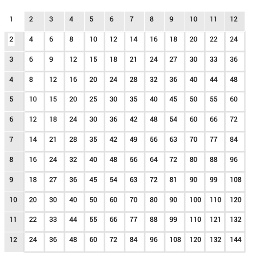
①本范例演示了一个基础的乘法表,可用于展示乘法运算结果。②涉及的核心数学概念包括乘法、比率和分数简化。③作图要点使用了GeoGebra的Sequence(数列)、Polygon(多边形)和Element(元素)命令,以及多个对象如h系列、v系列和list系列。④适合小学和初中数学教学,用于基础乘法学习和数学概念引入。
GeoGebra 命令及参数
Sequence(Sequence[Text[(i * j), (i, (-j))], j, 1, 12, 1], i, 1, 12, 1) → list1Sequence(Sequence[Polygon[(i - 0.25, 0.5 - j), (i + 0.75, 0.5 - j), (i + 0.75, -0.5 - j), (i - 0.25, -0.5 - j)], i, 1, 12, 1], j, 1, 12, 1) → list2Sequence(Sequence[(i + 0.75, -0.5 - j), i, 0, 12, 1], j, 0, 12, 1) → list3Polygon((0.75, -3.5), (1.75, -3.5), (1.75, -4.5), (0.75, -4.5)) → R4, i, j, k, lPolygon((0.75, -1.5), (1.75, -1.5), (1.75, -2.5), (0.75, -2.5)) → R2, a, b, c, dPolygon((0.75, -2.5), (1.75, -2.5), (1.75, -3.5), (0.75, -3.5)) → R3, b_5, c_5, d_5, e_5Polygon((0.75, -4.5), (1.75, -4.5), (1.75, -5.5), (0.75, -5.5)) → R5, j_5, k_5, l_5, m_5Polygon((0.75, -5.5), (1.75, -5.5), (1.75, -6.5), (0.75, -6.5)) → R6, n_5, p_5, q_5, r_5Polygon((0.75, -6.5), (1.75, -6.5), (1.75, -7.5), (0.75, -7.5)) → R7, s_5, t_5, a_6, b_6Polygon((0.75, -7.5), (1.75, -7.5), (1.75, -8.5), (0.75, -8.5)) → R8, c_6, d_6, e_6, f_6Polygon((0.75, -8.5), (1.75, -8.5), (1.75, -9.5), (0.75, -9.5)) → R9, g_6, h_6, i_6, j_6Polygon((0.75, -9.5), (1.75, -9.5), (1.75, -10.5), (0.75, -10.5)) → R10, k_6, l_6, m_6, n_6Polygon((0.75, -10.5), (1.75, -10.5), (1.75, -11.5), (0.75, -11.5)) → R11, p_6, q_6, r_6, s_6Polygon((0.75, -11.5), (1.75, -11.5), (1.75, -12.5), (0.75, -12.5)) → R12, t_6, a_7, b_7, c_7Polygon((1.75, -0.5), (1.75, -1.5), (2.75, -1.5), (2.75, -0.5)) → C2, d_7, e_7, f_7, g_7Polygon((2.75, -0.5), (2.75, -1.5), (3.75, -1.5), (3.75, -0.5)) → C3, h_7, i_7, j_7, k_7Polygon((3.75, -0.5), (3.75, -1.5), (4.75, -1.5), (4.75, -0.5)) → C4, l_7, m_7, n_7, p_7Polygon((4.75, -0.5), (4.75, -1.5), (5.75, -1.5), (5.75, -0.5)) → C5, m, n, p, qPolygon((5.75, -0.5), (5.75, -1.5), (6.75, -1.5), (6.75, -0.5)) → C6, e, f, g, hPolygon((6.75, -0.5), (6.75, -1.5), (7.75, -1.5), (7.75, -0.5)) → C7, e_8, f_8, g_8, h_8Polygon((7.75, -0.5), (7.75, -1.5), (8.75, -1.5), (8.75, -0.5)) → C8, i_8, j_8, k_8, l_8Polygon((8.75, -0.5), (8.75, -1.5), (9.75, -1.5), (9.75, -0.5)) → C9, m_8, n_8, p_8, q_8Polygon((9.75, -0.5), (9.75, -1.5), (10.75, -1.5), (10.75, -0.5)) → C10, r_8, s_8, t_8, a_9Polygon((11.75, -0.5), (11.75, -1.5), (12.75, -1.5), (12.75, -0.5)) → C12, r, s, t, f_1Polygon((10.75, -0.5), (10.75, -1.5), (11.75, -1.5), (11.75, -0.5)) → C11, b_9, c_9, d_9, e_9Sequence(Sequence[Polygon[(0.75 + i, -0.5 - j), (1.75 + i, -0.5 - j), 4], i, 1, 11, 1], j, 2, 12, 1) → list4Sequence(Sequence[Polygon[(-0.25 + i, -0.5 - j), (0.75 + i, -0.5 - j), (0.75 + i, 0.5 - j)], j, 1, 12, 1], i, 2, 12, 1) → ColElement(Col, 1) → Col_{02}Element(Col, 2) → Col_{03}Element(Col, 3) → Col_{04}Element(Col, 4) → Col_{05}Element(Col, 5) → Col_{06}Element(Col, 6) → Col_{07}Element(Col, 7) → Col_{08}Element(Col, 8) → Col_{09}Element(Col, 9) → Col_{10}Element(Col, 10) → Col_{11}Element(Col, 11) → Col_{12}Sequence(Sequence[Polygon[(-0.25 + i, -0.5 - j), (-0.25 + i, 0.5 - j), (0.75 + i, 0.5 - j)], i, 1, 12, 1], j, 2, 12, 1) → RowElement(Row, 1) → Row_{02}Element(Row, 2) → Row_{03}Element(Row, 3) → Row_{04}Element(Row, 4) → Row_{05}Element(Row, 5) → Row_{06}Element(Row, 6) → Row_{07}Element(Row, 7) → Row_{08}Element(Row, 8) → Row_{09}Element(Row, 9) → Row_{10}Element(Row, 10) → Row_{11}Element(Row, 11) → Row_{12}
AI 绘图提示语参考
绘制一个12x12的乘法表,从左上角开始,依次绘制每个单元格,每个单元格内写入乘法表达式,如1*1, 1*2等,单元格之间用小正方形隔开,每个单元格的左下角和右上角分别与相邻单元格相连,形成网格状布局。
以上提示语为根据原始绘图命令整理而来,仅供参考。