
矩阵的四个子空间
几何画板及绘图内容加载中,请稍等……
所属专题
Complex Math
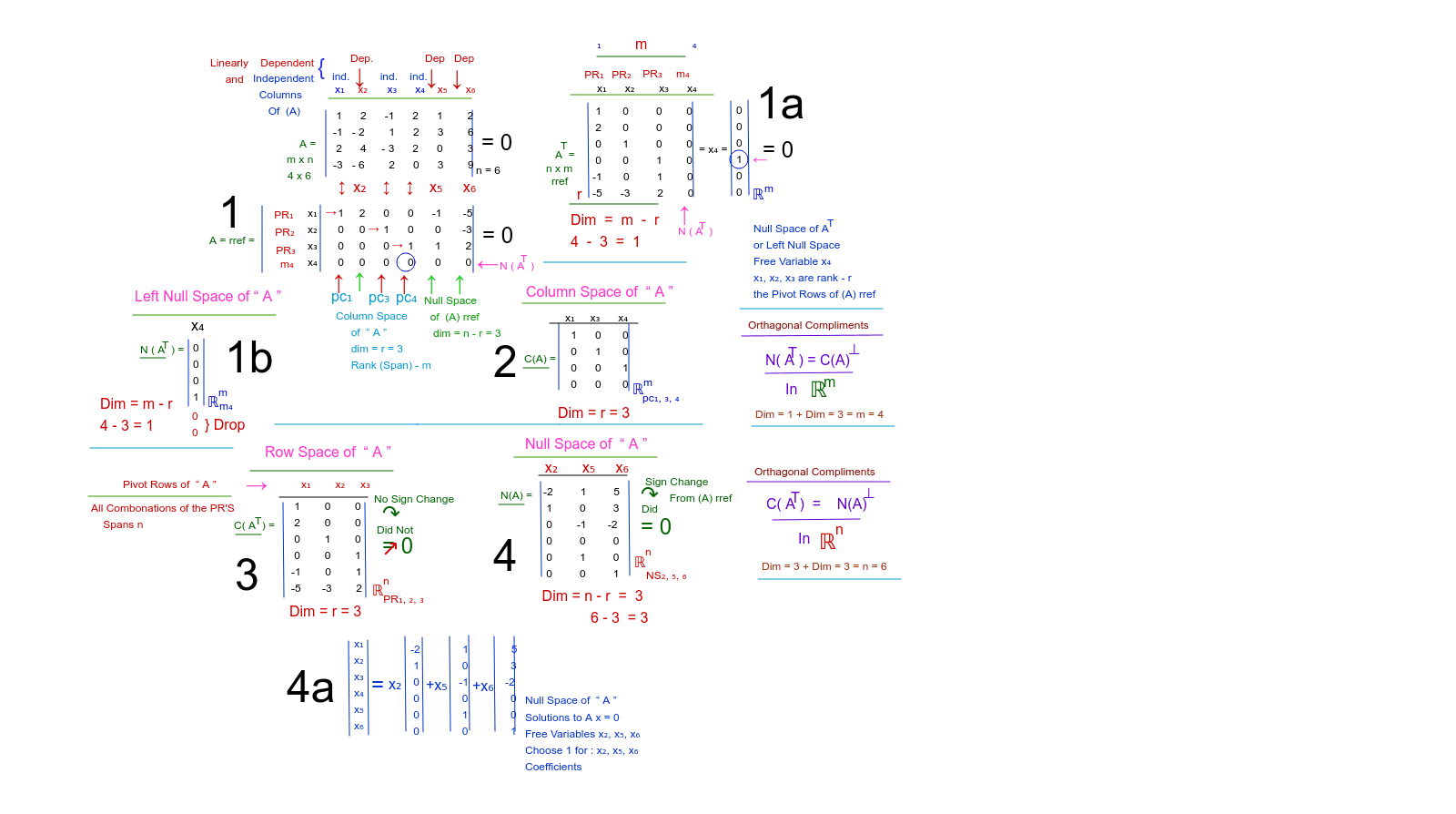
①本范例通过图形演示矩阵的四个子空间(列空间、行空间、零空间、左零空间);②涉及核心数学概念包括线性代数中的子空间、基、维数等;③作图要点:使用 GeoGebra 命令 Segment(线段)、Vector(向量)、Circle(圆)等绘制图形,并创建多个文本对象(text1_1, text4_1 等)和向量/点对象(A, B, a, A_1 等);④适合高中及以上学生或线性代数初学者学习参考。
GeoGebra 命令及参数
Segment(A, B) → aSegment(A_1, B_1) → a_1Segment(C, D) → bSegment(C_1, D_1) → b_1Segment(A_2, B_2) → a_2Segment(A_3, B_3) → a_3Segment(C_2, D_2) → b_2Segment(C_3, D_3) → b_3Segment(C_4, D_4) → b_4Segment(C_5, D_5) → b_5Segment(A_4, B_4) → a_4Segment(A_5, B_5) → a_5Segment(A_6, B_6) → a_6Segment(A_7, B_7) → a_7Segment(A_8, B_8) → a_8Segment(C_6, D_6) → b_6Segment(C_7, D_7) → b_7Segment(E, F) → cSegment(E_1, F_1) → c_1Segment(E_2, F_2) → c_2Segment(E_3, F_3) → c_3Segment(E_4, F_4) → c_4Segment(E_5, F_5) → c_5Segment(G, H) → dSegment(G_1, H_1) → d_1Vector(I, J) → uSegment(E_6, F_6) → c_6Segment(E_7, F_7) → c_7Segment(K, L) → eSegment(K_1, L_1) → e_1Segment(M, N) → fSegment(K_2, L_2) → e_2Segment(K_3, L_3) → e_3Segment(K_4, L_4) → e_4Segment(E_8, F_8) → c_8Circle(O, P) → gCircle(O_1, P_1) → g_1Segment(C_8, D_8) → b_8Segment(C_9, D_9) → b_9Segment(C_{10}, D_{10}) → b_{10}Segment(C_{11}, D_{11}) → b_{11}Segment(C_{12}, D_{12}) → b_{12}Segment(C_{13}, D_{13}) → b_{13}Segment(C_{14}, D_{14}) → b_{14}Segment(C_{15}, D_{15}) → b_{15}Segment(Q, R) → hSegment(Q_1, R_1) → h_1Segment(Q_2, R_2) → h_2Segment(Q_3, R_3) → h_3Segment(E_9, F_9) → c_9Segment(E_{10}, F_{10}) → c_{10}Segment(E_{11}, F_{11}) → c_{11}Segment(E_{12}, F_{12}) → c_{12}Segment(E_{13}, F_{13}) → c_{13}Segment(E_{14}, F_{14}) → c_{14}Segment(E_{15}, F_{15}) → c_{15}Segment(E_{16}, F_{16}) → c_{16}
AI 绘图提示语参考
绘制一个矩阵的四个子空间:用线段表示列空间和行空间,向量表示基向量,用圆圈表示高维空间中的几何关系,并标注各个子空间。首先画出两组平行线段表示不同的子空间,然后用向量连接关键点,最后用圆圈突出高维空间特性,整体构造清晰展示线性代数中的子空间概念。
以上提示语为根据原始绘图命令整理而来,仅供参考。