
七巧板 v2
几何画板及绘图内容加载中,请稍等……
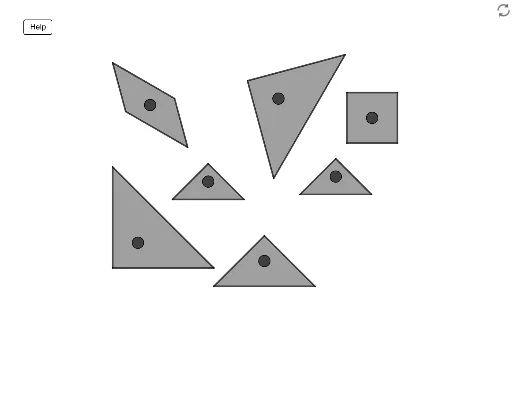
这个范例演示了七巧板的几何构造。它涉及到了三角形、多边形和几何变换等核心数学概念。通过使用GeoGebra命令如Circle、OrthogonalLine、Intersect、Rotate等,可以动态地展示七巧板的各个部件如何通过旋转、平移和构造圆等操作组合成不同的图案。适合初中及以上学生学习几何作图和变换。
GeoGebra 命令及参数
Circle(A, (1 / 4 * Size)) → cOrthogonalLine(A, xAxis) → fIntersect(c, f, 2) → BRotate(B, BigT1Rotate°, A) → B'Line(B', A) → gOrthogonalLine(A, g) → hIntersect(c, h, 2) → CVector(A, B') → uVector(A, C) → vTranslate(C, u) → C'Translate(C', u) → C''Translate(C, Vector[(-2 * u)]) → C'_1Intersect(c, h, 1) → DPolygon(D, C'_1, C'') → t1, c'', d, c'_1Circle(E, (1 / 4 * Size)) → eOrthogonalLine(E, xAxis) → iIntersect(e, i, 2) → FRotate(F, BigT2Rotate°, E) → F'Vector(E, F') → wOrthogonalLine(E, w) → jIntersect(e, j, 1) → GIntersect(e, j, 2) → HVector(E, G) → aTranslate(G, Vector[(2 * w)]) → G'Translate(G, Vector[(2 * (-w))]) → G'_1Polygon(H, G'_1, G') → t2, g', h_1, g'_1Circle(I, (1 / 4 * Size)) → kOrthogonalLine(I, xAxis) → lIntersect(k, l, 2) → JRotate(J, SquareRotate°, I) → J'Vector(I, J') → bOrthogonalLine(I, b) → mIntersect(k, m, 1) → KIntersect(k, m, 2) → LOrthogonalLine(I, m) → nIntersect(k, n, 2) → MPolygon(J', L, M, K) → q1, j', l_1, m_1, k_1Circle(N, (1 / 8 * Size)) → pOrthogonalLine(N, xAxis) → qIntersect(p, q, 2) → ORotate(O, SmallT1Rotate°, N) → O'Vector(N, O') → rOrthogonalLine(N, r) → sIntersect(p, s, 1) → PVector(N, P) → tLine(N, O') → f_1Intersect(p, f_1, 1) → QTranslate(Q, Vector[(2 * t)]) → Q'Translate(Q, Vector[(2 * (-t))]) → Q'_1Polygon(O', Q'_1, Q') → t3, q', o', q'_1Circle(R, (1 / 8 * Size)) → c_1OrthogonalLine(R, xAxis) → g_1Intersect(c_1, g_1, 2) → SRotate(S, SmallT2Rotate°, R) → S'Line(S', R) → i_1OrthogonalLine(R, i_1) → j_1Intersect(c_1, i_1, 2) → TIntersect(c_1, j_1, 2) → UVector(R, S') → u_1Vector(R, U) → v_1Translate(T, v_1) → T'Translate(T', v_1) → T''Intersect(c_1, j_1, 1) → VVector(R, V) → w_1Translate(T, w_1) → T'_1Translate(T'_1, w_1) → WPolygon(S', W, T'') → t4, t'', s', w_2Circle(Z, (sqrt(2) / 8 * Size)) → d_1OrthogonalLine(Z, xAxis) → n_1Intersect(d_1, n_1, 2) → A_1Rotate(A_1, MediumTRotate°, Z) → B_1Line(Z, B_1) → p_1OrthogonalLine(Z, p_1) → q_1Intersect(d_1, q_1, 2) → D_1Intersect(d_1, p_1, 1) → E_1Intersect(d_1, q_1, 1) → F_1Vector(Z, B_1) → a_1Vector(Z, F_1) → b_1Vector(Z, D_1) → e_1Translate(E_1, b_1) → G_1Translate(G_1, b_1) → H_1Translate(E_1, e_1) → I_1Translate(I_1, e_1) → J_1Polygon(B_1, J_1, H_1) → t5, r_1, s_1, t_1Circle(K_1, (1 / 8 * Size)) → c_2OrthogonalLine(K_1, xAxis) → f_2Intersect(c_2, f_2, 2) → L_1Rotate(L_1, ParallelogramRotate°, K_1) → M_1Line(M_1, K_1) → g_2OrthogonalLine(K_1, g_2) → h_2Intersect(c_2, h_2, 1) → O_1Intersect(c_2, g_2, 2) → P_1Intersect(c_2, h_2, 2) → Q_1Vector(K_1, Q_1) → u_2Vector(K_1, M_1) → v_2Vector(K_1, O_1) → a_2Vector(K_1, P_1) → b_2Translate(P_1, u_2) → R_1Translate(R_1, u_2) → S_1Translate(S_1, u_2) → T_1Translate(P_1, a_2) → U_1Translate(M_1, a_2) → V_1Translate(V_1, a_2) → W_1Translate(W_1, a_2) → Z_1Translate(M_1, u_2) → A_2Polygon(Z_1, U_1, T_1, A_2) → q2, z_1, i_2, j_2, k_2