
圆中的对称性
几何画板及绘图内容加载中,请稍等……
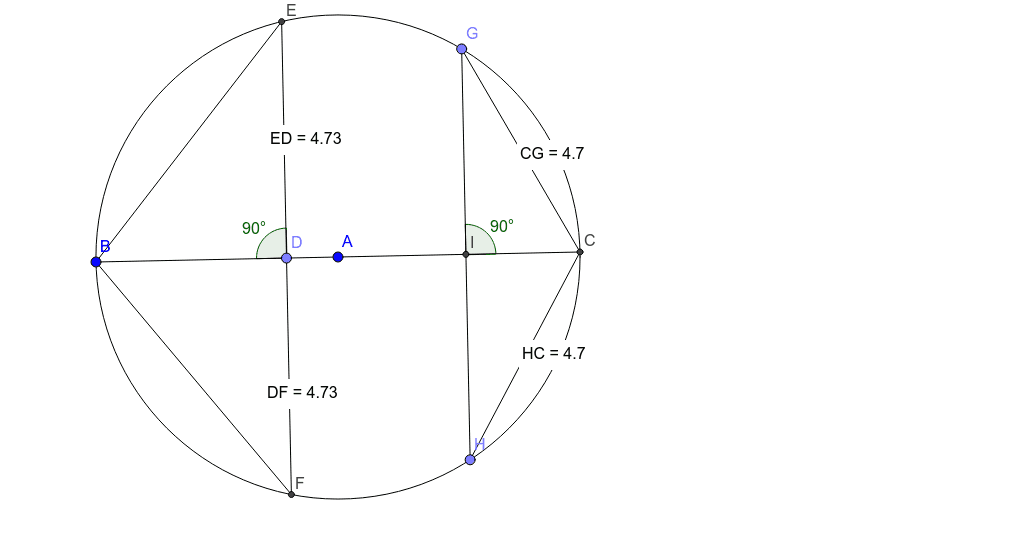
①本范例演示了三角形在圆内旋转的对称性现象;②涉及的核心数学概念包括圆、对称、外接圆、旋转、三角形、根、线性函数;③作图要点——使用了GeoGebra命令:Circle(圆)、Line(线)、Intersect(交点)、Segment(线段)、Point(点)、OrthogonalLine(垂线)、Angle(角度)、Distance(距离);对象包括A, B, c, a, C, b, D, d, E, F, e, α, distanceED, TextED, distanceDF, TextDF, f, g, distanceEB, distanceBF, G, H, h, I, β, i, j, distanceGI, distanceIH, distanceHC, TextHC, distanceCG, TextCG;④适合高中阶段学习几何变换和对称性的学生。
GeoGebra 命令及参数
Circle(A, B) → cLine(A, B) → aIntersect(c, a, 2) → CSegment(B, C) → bPoint(b) → DOrthogonalLine(D, b) → dIntersect(c, d, 2) → EIntersect(c, d, 1) → FSegment(E, F) → eAngle(E, D, B) → αDistance(E, D) → distanceEDDistance(D, F) → distanceDFSegment(B, F) → fSegment(B, E) → gDistance(E, B) → distanceEBDistance(B, F) → distanceBFPoint(c) → GPoint(c) → HSegment(G, H) → hIntersect(b, h) → IAngle(G, I, C) → βSegment(G, C) → iSegment(C, H) → jDistance(G, I) → distanceGIDistance(I, H) → distanceIHDistance(H, C) → distanceHCDistance(C, G) → distanceCG
AI 绘图提示语参考
画一个圆,并在圆内画一个三角形,使其旋转对称。首先画出圆和圆内的一条线段,找到线段与圆的交点,连接这些点形成三角形。接着,从线段的中点画一条垂直线,交圆于两点,连接这两点并找到与原线段的交点。测量并标注角度和距离,最后连接相关点以展示旋转对称性。
以上提示语为根据原始绘图命令整理而来,仅供参考。