
无穷级数求和
几何画板及绘图内容加载中,请稍等……
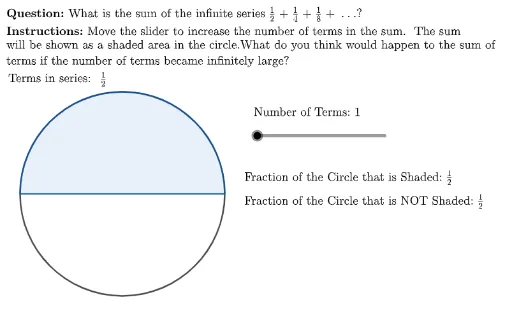
本范例演示了如何通过几何画板计算无穷级数的和。核心数学概念包括数列和极限。使用了Polygon, Sequence, Sector, Zip等GeoGebra命令。适合高中数学教学和学习。
GeoGebra 命令及参数
UnicodeToLetter(10007) → xmarkUnicodeToLetter(10003) → cmarkPolygon({(left, bottom), (left, top), (right, top), (right, bottom)}) → viewboxLaTeX((((("\text{\textbf{Question: }" * MainInstruc) * "\\\textbf{Instructions: }") * SpecInstruc) * "}")) → allInstrucCircle(Origin, circRadius) → cSequence(1 / 2^(i), i, 1, numTerms) → allTermsSequence(1 - (1 / 2)^(i), i, 1, numTerms) → SumOfTermsSequence(Sector[c, 0, ((Element[SumOfTerms, i] * 2) * π)], i, 1, numTerms) → allSectorsSector(c, 0, (((1 - (1 / 2)^(numTerms)) * 2) * π)) → fullShadedAreaZip(NumToTfrac[A], A, allTerms) → allTermsLatexAppend(Sequence["\text{ +}", i, 1, numTerms - 1], "") → plusSignsTableText({Flatten[Zip[(A * B), A, allTermsLatex, B, plusSigns]]}) → seriesDisplayTableText({{(("\text{\vphantom{\dfrac{1}{2}}Fraction of the Circle that is Shaded: \(" * NumToTfrac[1 - 1 / 2^(numTerms)]) * "\)}"), (("\text{Fraction of the Circle that is NOT Shaded: \(" * NumToTfrac[1 / 2^(numTerms)]) * "\)}")}}, "v") → dataDisplay
AI 绘图提示语参考
绘制一个无限级数的图形,包括一个圆和一系列扇形。圆的半径为1,圆心在原点。使用序列生成一系列从1/2开始的分数,每个分数都是前一个的一半。这些分数代表圆的阴影部分,每个扇形的面积等于相应分数的两倍圆周。最后,显示阴影部分和未阴影部分的圆心角所占比例。
以上提示语为根据原始绘图命令整理而来,仅供参考。