
蜘蛛与苍蝇
几何画板及绘图内容加载中,请稍等……
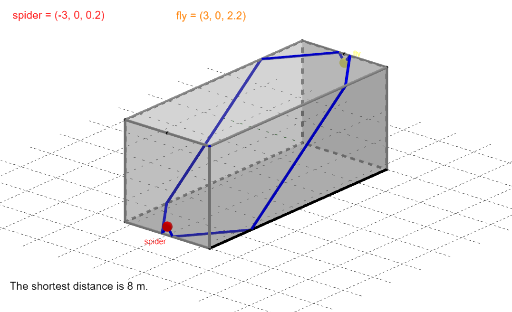
这个范例演示了蜘蛛和苍蝇之间的最短路径问题。涉及的核心数学概念包括相似三角形、角度和最值优化。通过使用GeoGebra命令如Mirror、Polygon、PointIn等,可以构造出复杂的几何图形。适合高中数学教学和学习。
GeoGebra 命令及参数
Mirror(A, xAxis) → DMirror(A, (0, 0, 0)) → CMirror(A, yAxis) → BPolygon(A, B, C, D) → v1, a, b, c, dPrism(v1, E) → quad, F, KanteBF, KanteCG, KanteDH, KanteEF, KanteFG, KanteGH, KanteEH, G, H, FlächeABFE, FlächeBCGF, FlächeCDHG, FlächeADHE, Deck, KanteAENet(quad, l_{13}) → net1, I, R, S, T, U, V, Fläche7, Fläche8, Fläche9, Fläche10, Fläche11, J, Fläche12, Kante19, Kante20, Kante21, Kante22, Kante23, Kante24, Kante25, Kante26, Kante27, K, Kante28, Kante29, Kante30, Kante31, Kante32, Kante33, Kante34, Kante35, Kante36, Kante37, L, M, N, O, P, QPointIn(FlächeADHE) → spiderPointIn(FlächeBCGF) → flyDistance(A, B) → langRotate(spider_B, 90°, A) → spider2Rotate(spider2, 90°, M) → spider3Rotate(spider_B, -90°, D) → spider1Segment(spider3, fly_B) → l_{10}Segment(spider2, fly_B) → l_8Segment(spider1, fly_B) → l_2Segment(spider_B, fly_B) → l_5Rotate(fly_B, -90°, B) → fly2Rotate(fly2, -90°, N) → fly3Segment(spider_B, fly3) → l_{11}Segment(spider2, fly2) → l_9Segment(spider1, fly2) → l_3Segment(spider_B, fly2) → l_6Rotate(fly_B, 90°, C) → fly1Segment(spider2, fly1) → l_7Segment(spider1, fly1) → l_1Segment(spider_B, fly1) → l_4OrthogonalLine(A, xOyPlane) → fDistance(A, E) → hochSegment(spider3, fly3) → l_{12}Min(lStr) → minimDistance(B, C) → breitNet(quad, g) → net2, W, I_1, J_1, K_1, L_1, M_1, Fläche1, Fläche2, Fläche3, Fläche4, Fläche5, Z, Fläche6, Kante1, Kante2, Kante3, Kante4, Kante5, Kante6, Kante7, Kante8, Kante9, A_1, Kante10, Kante11, Kante12, Kante13, Kante14, Kante15, Kante16, Kante17, Kante18, Kante38, B_1, C_1, D_1, F_1, G_1, H_1Intersect(l_1, Kante31) → S11Intersect(l_1, Kante29) → S12Rotate(S11, ((g - 1) * 90°), c) → S11gRotate(S12, ((g - 1) * 90°), c) → S12gRotate(spider_B, ((g - 1) * 90°), d) → spidergRotate(fly_B, ((g - 1) * 90°), b) → flygSegment(spiderg, S11g) → s11Segment(S11g, S12g) → s12Segment(S12g, flyg) → s13Intersect(l_2, Kante31) → S21Intersect(c, l_2) → S22Intersect(b, l_2) → S23Segment(S22, S23) → s23Rotate(S21, ((g - 1) * 90°), c) → S21gSegment(spiderg, S21g) → s21Segment(S21g, S22) → s22Segment(S23, flyg) → s24Intersect(d, l_5) → S51Intersect(b, l_5) → S52Segment(spiderg, S51) → s51Segment(S51, S52) → s52Segment(S52, flyg) → s53Intersect(l_8, Kante23) → S91Intersect(a, l_8) → S82Intersect(b, l_8) → S83Segment(S82, S83) → s83Segment(S83, flyg) → s84Rotate(S91, ((g - 1) * 90°), a) → S81gSegment(spiderg, S81g) → s81Segment(S81g, S82) → s82Intersect(l_9, Kante25) → S92Rotate(S91, ((g - 1) * 90°), a) → S91gRotate(S92, ((g - 1) * 90°), a) → S92gSegment(spiderg, S91g) → s91Segment(S91g, S92g) → s92Segment(S92g, flyg) → s93Intersect(l_3, Kante31) → S31Intersect(a, l_3) → S33Rotate(S31, ((g - 1) * 90°), c) → S31gIntersect(c, l_3) → S32Segment(spiderg, S31g) → s31Segment(S31g, S32) → s32Segment(S32, S33) → s33Intersect(d, l_6) → S61Intersect(a, l_6) → S62Intersect(Kante25, l_6) → S63Rotate(S63, ((g - 1) * 90°), a) → S63gSegment(spiderg, S61) → s61Segment(S61, S62) → s62Segment(S62, S63g) → s63Segment(S63g, flyg) → s64Intersect(l_4, d) → S41Intersect(l_4, c) → S42Intersect(l_4, Kante29) → S43Rotate(S43, ((g - 1) * 90°), c) → S43gSegment(spiderg, S41) → s41Segment(S41, S42) → s42Segment(S42, S43g) → s43Intersect(l_7, Kante23) → S71Intersect(a, l_7) → S72Intersect(c, l_7) → S73Intersect(l_7, Kante29) → S74Rotate(S71, ((g - 1) * 90°), a) → S71gRotate(S74, ((g - 1) * 90°), c) → S74gSegment(S74g, flyg) → s75Segment(S72, S73) → s73Segment(S73, S74g) → s74Segment(spiderg, S71g) → s71Segment(S71g, S72) → s72Polygon(E_1, S, D, R) → v2, e_1, s, d_1, rPolygon(Q, C, P, E_4) → v3, q, c_1, p, e_4Polygon(T, E_2, M, A) → v4, t, e_2, m, a_1Polygon(B, N, E_3, O) → v5, b_1, n, e_3, oSegment(spider3, fly2) → hSegment(spider2, fly3) → iPolygon(E_2, E_5, V, M) → v6, j, e_5, v, m_1Polygon(N, U, E_6, E_3) → v7, n_1, u, e_6, kIntersect(Kante38, Kante37) → N_1Intersect(Kante38, Kante37) → O_1Intersect(Kante38, Kante37) → P_1Intersect(Kante6, Kante24) → R_1Intersect(Kante6, Kante24) → S_1Intersect(Kante6, Kante24) → T_1Intersect(a, Kante1) → V_1Intersect(a, Kante1) → W_1Intersect(l_{10}, a) → S103Intersect(b, Kante2) → A_2Intersect(l_{10}, b) → S104Intersect(l_{10}, Kante24) → S102Intersect(l_{10}, Kante37) → S101Rotate(Rotate[S101, ((g - 1) * 90°), a], ((-(g - 1)) * 90°), Kante6) → S101gRotate(S102, ((g - 1) * 90°), a) → S102gSegment(spiderg, S101g) → s101Segment(S101g, S102g) → s102Segment(S102g, S103) → s103Segment(S103, S104) → s104Segment(S104, flyg) → s105Mirror(spiderg, xzEbene) → spiderg'Mirror(S101g, xzEbene) → S101g'Mirror(S102g, xzEbene) → S102g'Mirror(S103, xzEbene) → S103'Mirror(S104, xzEbene) → S104'Mirror(flyg, xzEbene) → flyg'PolyLine(spiderg', S101g', S102g', S103', S104', flyg') → p10'Intersect(l_{11}, a) → S112Intersect(l_{11}, Kante24) → S113Intersect(l_{11}, Kante35) → S114Intersect(l_{11}, d) → S111Rotate(S113, ((g - 1) * 90°), a) → S113gRotate(Rotate[S114, ((g - 1) * 90°), a], ((-(g - 1)) * 90°), Kante6) → S114gPolyLine(spiderg, S111, S112, S113g, S114g, flyg) → p11Mirror(S111, xzEbene) → S111'Mirror(S112, xzEbene) → S112'Mirror(S113g, xzEbene) → S113g'Mirror(S114g, xzEbene) → S114g'PolyLine(spiderg', S111', S112', S113g', S114g', flyg') → p11'PolyLine(spiderg, S101g, S102g, S103, S104, flyg) → p10Segment(S43g, flyg) → s44Intersect(Kante37, l_{12}) → S121Intersect(Kante35, n_1) → U_1Intersect(l_{12}, Kante35) → S122Rotate(Rotate[S121, ((g - 1) * 90°), a], ((-(g - 1)) * 90°), Kante6) → S121gRotate(Rotate[S122, ((g - 1) * 90°), a], ((-(g - 1)) * 90°), Kante6) → S122gRotate(Rotate[Rotate[spider3, ((g - 1) * 90°), a], ((-(g - 1)) * 90°), Kante6], ((-(g - 1)) * 90°), Kante38) → spider3gRotate(Rotate[Rotate[fly3, ((g - 1) * 90°), a], ((-(g - 1)) * 90°), Kante6], ((-(g - 1)) * 90°), Kante17) → fly3gSegment(spider3g, S121g) → s121Segment(S121g, S122g) → s122Segment(S122g, fly3g) → s123
AI 绘图提示语参考
绘制一个长方体,其底面为正方形,四个顶点依次连接。在长方体的两个相对侧面上分别放置一个点和另一个点,代表蜘蛛和苍蝇。将长方体展开成平面展开图,并展示从蜘蛛到苍蝇的所有可能路径,包括经过不同棱边的折线。在展开图中,通过旋转和镜像操作,将蜘蛛和苍蝇的位置映射到展开图的各个面上,并画出多条连接它们的线段。最后,标出最短路径,并显示路径经过的棱边交点。
以上提示语为根据原始绘图命令整理而来,仅供参考。