
排序表达式与方程
几何画板及绘图内容加载中,请稍等……
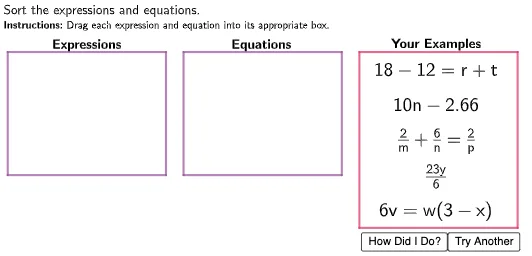
①本范例演示如何使用 GeoGebra 对数学表达式和方程进行排序和比较;②涉及的核心数学概念包括方程、百分比、相似三角形、上下和或黎曼和、超几何分布、根等;③作图要点——从下方『构造摘要』提炼用到了 Polygon 命令、对象如 TryAnother, Box1, f, g, h, i, Point1, Point2, Point3, Point4, Point5, Numbers, numExp, numEq, PointLocator, Example1, Example2, Example3, Example4, Example5, Expressions 等;④适合高中及以上数学学习者和教师用于教学和探索数学概念。
GeoGebra 命令及参数
Polygon((0, 2.5), (0, 6), (4.5, 6), (4.5, 2.5)) → Box1, f, g, h, iPolygon((10, 1), (10, 6), (14.5, 6), (14.5, 1)) → Box3, n, p, q, rPolygon((5, 2.5), (5, 6), (9.5, 6), (9.5, 2.5)) → Box2, j, k, l, mPolygon(Point1, Point1 + (width1, 0), Point1 + (width1, -0.8), Point1 + (0, -0.8)) → DragBox1, s, t, a, bPolygon(Point2, Point2 + (width2, 0), Point2 + (width2, -0.8), Point2 + (0, -0.8)) → DragBox2, c, d, e, f_1Polygon(Point3, Point3 + (width3, 0), Point3 + (width3, -0.8), Point3 + (0, -0.8)) → DragBox3, g_1, h_1, i_1, j_1Polygon(Point4, Point4 + (width4, 0), Point4 + (width4, -0.8), Point4 + (0, -0.8)) → DragBox4, k_1, l_1, m_1, n_1Polygon(Point5, Point5 + (width5, 0), Point5 + (width5, -0.8), Point5 + (0, -0.8)) → DragBox5, p_1, q_1, r_1, s_1